Goal
Create a review ticket that binds a set of SQL statements to a database engine and version, review policy, priority, and optional workspace, producing a traceable record.Fill in the ticket fields
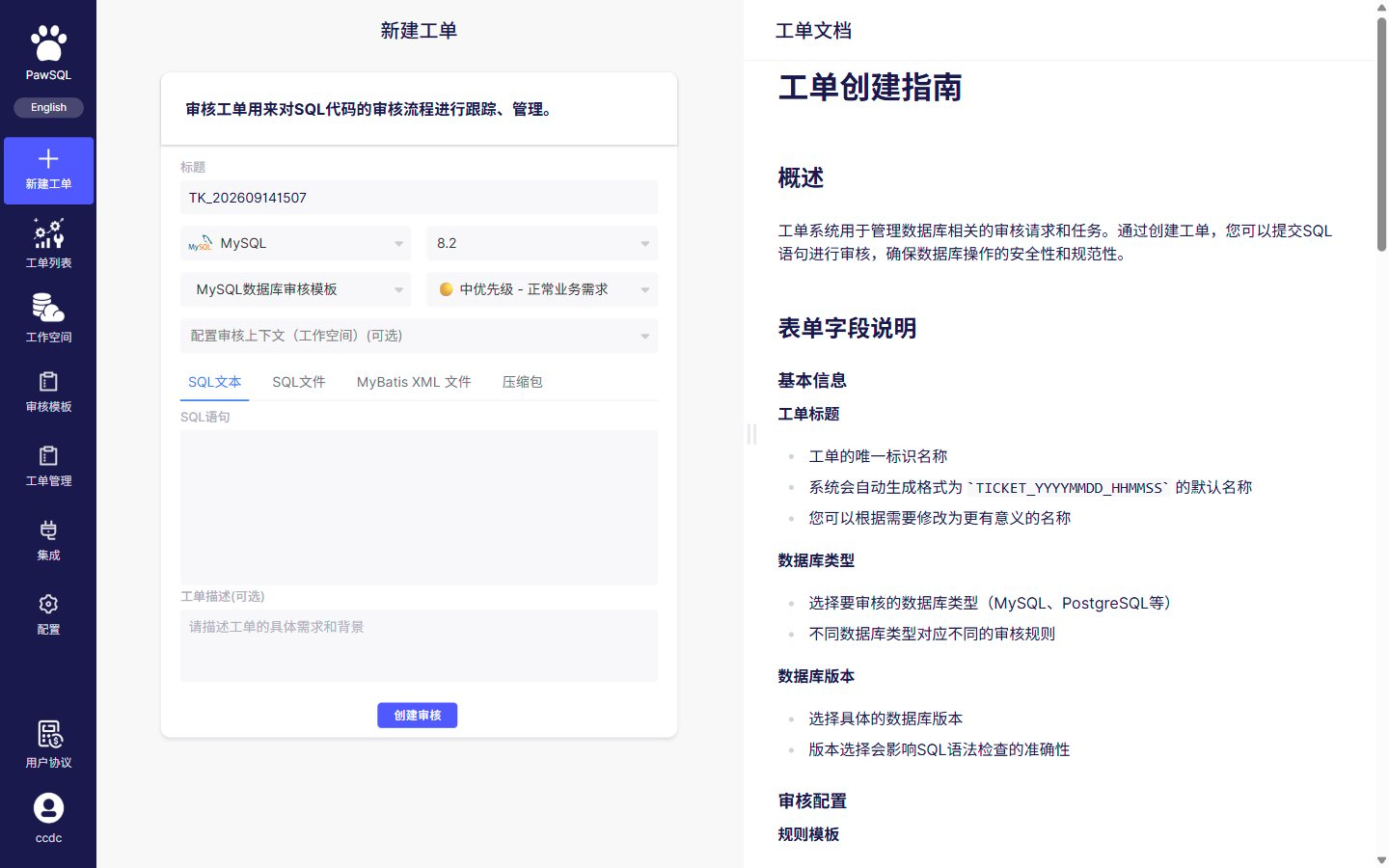
Creating a review ticket is a single form, with fields in order
1
Title (ticket number)
The title defaults to an auto-generated value based on creation time, for example
TK_202609141244. You can replace it with a name that identifies the business system, change, and environment.2
Choose the database engine and version
Select the engine and version where the SQL will run. The engine selects the SQL dialect and available rules; the version controls version-specific rules.
3
Choose a review policy
Pick a matching review policy from the dropdown (the interface may label it “review template”). The policy determines the enabled rules, severities, and thresholds. See Review policy.
4
Set the priority
Select a ticket priority (low, medium, high, urgent). Priority drives ordering, handling, and gate decisions, and is independent of the severity computed after review.
5
Configure the workspace (optional)
Choose a workspace that matches the target environment when you need table, column, constraint, or index recognition, or optimization guidance. See Workspace.
6
Enter the SQL
Choose an input method (SQL text, SQL file, MyBatis XML file, or archive) and paste or upload the SQL under review.
7
Add a ticket description (optional)
Describe the ticket’s purpose and background so reviewers understand the change.
8
Create the review
Review the fields and submit to create the review ticket.
Database engine and version
The engine and version are not just labels. They determine:- which SQL dialect is parsed;
- which review rules are available;
- what parameter values a given rule uses;
- whether version-specific rules apply;
- whether database-specific syntax is recognized.
Whether to choose a workspace
SQL input methods
SQL text requirements
- Use syntax consistent with the target database.
- Submit complete statements, not partial conditions or fragments.
- Separate multiple ordinary statements using a delimiter supported by the target database and your PawSQL edition.
- Keep comments that aid review, but remove passwords, tokens, and sensitive business data.
- Check that copying did not corrupt quotes, line breaks, or special characters.
- Do not include stack traces, application logs, or Markdown code fences.
SQL file requirements
- Use a file type supported by the current edition.
- Use a character encoding supported by the product and agreed on by your team.
- Make sure files are not compressed, encrypted, or bundled with binary content (except when using the archive method).
- Check per-file and per-ticket size limits.
- Name files so the system, change, and version are identifiable.
- Run virus checks and data masking before uploading.
Ordinary multi-statement scripts usually separate statements with semicolons. Stored procedures, anonymous blocks, and some database scripts may contain internal semicolons or proprietary batch separators; follow the current PawSQL edition’s support for the target database.
Parameterized SQL
Application SQL may contain question-mark parameters, named parameters, or template expressions. Before submitting:- Use a parameter form PawSQL supports.
- Preserve parameter data types and binding order.
- Replace real business data with masked values.
- Reduce a dynamic template that cannot be parsed to a single representative SQL statement.
- Prepare a representative parameter set when an execution plan is needed.
Handling parse failures
- Confirm the database engine and version.
- Reduce to a single minimal SQL statement.
- Check quotes, parentheses, comments, and delimiters.
- Check variables, batch commands, and stored procedure syntax.
- Confirm file encoding and invisible characters.
- Record the PawSQL version, ticket number, line number, and full error message.
Expected Result
After submission, the ticket enters a queued, running, or completed state with a detected statement count, and its review result can be tracked.Pre-submit checklist
- The ticket title (ticket number) is correct.
- The database engine and version are correct.
- The review policy is correct.
- The priority reflects reality.
- The detected statement count matches expectations.
- The workspace matches the target environment, or you explicitly skipped it.
- The SQL is masked and uses the correct statement delimiter.
- The ticket entered a queued, running, or completed state with no unexplained partial failure.