Goal
Configure input, validation, index recommendation, and rule options to control how rewrites and index suggestions are produced.Prerequisites
A workspace and the SQL you want to optimize within that workspace.Basic configuration
- Optimization ID: identifies this optimization task.
- Index recommendation only: controls whether rewrite is enabled. When the SQL is already in production and changes cannot be applied immediately, enable this option — PawSQL will not rewrite the SQL and will only recommend indexes based on the original SQL.
Validation
- Update DDL information: whether to connect to the verification database to fetch the latest DDL.
- Perform What-If verification: controls whether recommendations are performance-validated. When enabled, the optimization details provide execution plans and cost estimates before and after optimization.
- Enable Analyze: during What-If verification, obtain the real parse and execution time so cost estimates are more accurate.
Index recommendation configuration
- Dedup with existing indexes: whether to exclude recommendations that duplicate existing indexes. Enable this when the input SQL represents only part of the database queries and you do not intend to drop existing indexes.
- Recommend covering indexes: whether to consider covering indexes. Covering indexes avoid table lookups and can substantially improve performance, but include columns not used in the query and increase disk usage.
- Maximum covering index columns: limits the column count of a covering index to bound its space usage.
- Maximum index columns: limits the column count of an index to avoid a wide index deepening the index tree.
- Maximum indexes per table: audits the index count per table and warns, since indexes add disk usage and slow down DML.
Rule configuration
Enable or disable individual optimization rules and adjust their thresholds.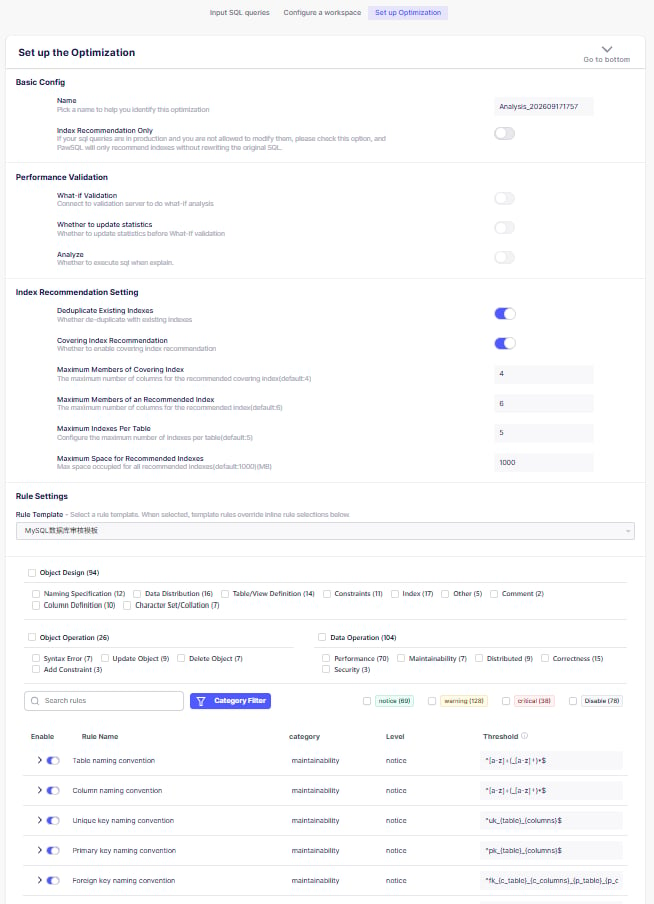
Configure the basic, validation, index recommendation, and rule options
Submit and confirm success
After submitting, once the task completes, at least check that:- Parsing completed.
- Engine and version are correct.
- Schemas, tables, and columns resolved correctly.
- Statement boundaries were detected correctly.
- Expected analysis modules ran.
- No unexplained partial failure remains.