> ## Documentation Index
> Fetch the complete documentation index at: https://docs.pawsql.com/llms.txt
> Use this file to discover all available pages before exploring further.
> ## Agent Instructions
> PawSQL 是一个产品:Cloud 是公网部署形态,Engine / Optimizer / Auditor / Advisor / Patroller 是同一产品的组件与交付形态,不是彼此独立的产品。 / PawSQL is a single product: Cloud is the public deployment form, while Engine / Optimizer / Auditor / Advisor / Patroller are components and delivery forms of the same product, not separate products.
> 术语以站内术语表为准:SQL 审核对应英文 SQL Review,查询重写对应 Query Rewrite,索引推荐对应 Index Recommendation;英文内容统一用 Review,不用 Audit。 / Use the site glossary for terminology: 审核 is SQL Review, 重写 is Query Rewrite, 索引推荐 is Index Recommendation; English content uses Review, never Audit.
> 引用能力范围或版本支持时以对应页面为准;标注 unknown、或 status 非 published 的内容表示尚未经产品核实,不应作为事实引用。 / Cite capability scope and version support from the corresponding page; content marked unknown, or with a status other than published, is not yet product-verified and must not be cited as fact.
# Read Review Results
> Interpret review coverage, severity summaries, and individual findings before making a release decision.
Begin by confirming that PawSQL completed the review for the full input. Then move from the overall risk profile to individual findings. A low finding count alone is not evidence that SQL is ready for release.
## Goal
Interpret review coverage, severity summaries, and individual findings to support a release decision.
## Prerequisites
A review ticket that has completed (or partially completed) and is available to open.
## Result page layout
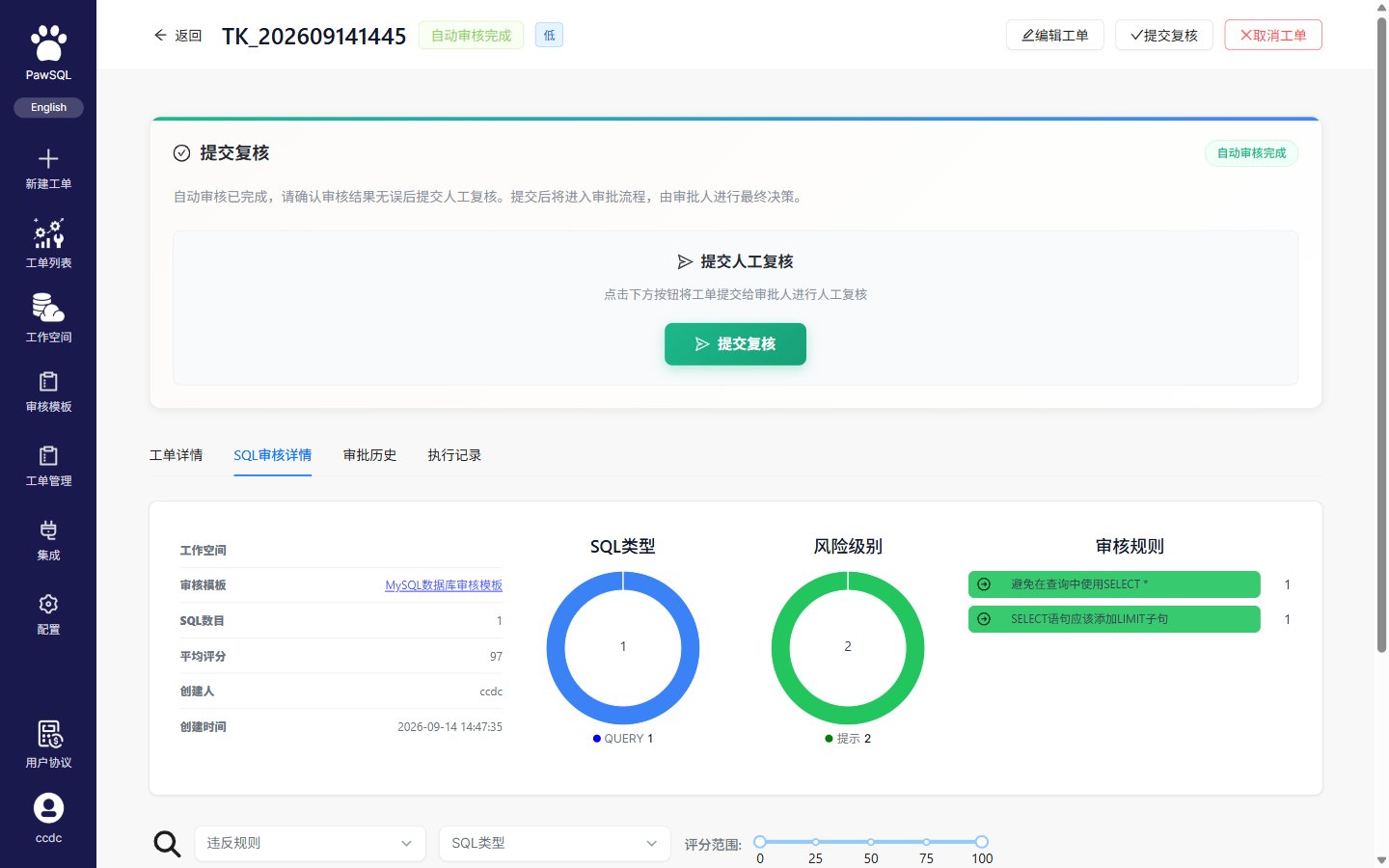
The review ticket detail page organizes results into tabs:
| Tab | Contents |
| ------------------ | ------------------------------------------------------------------------------------------------------------------------------------------------------------------------------ |
| Ticket details | Basic information (title, status, risk grade, database engine, creator/time, etc.) and the automated review result (risk score, review status, statement count, rule template) |
| SQL review details | Risk summary, the list of violated rules, and per-statement findings |
| Approval history | The approval timeline, recording automated review and human approval steps |
| Execution records | Execution history after approval |
The core of the result is the "SQL review details" tab: its header shows the workspace, review policy, statement count, average score, statement-type distribution, and severity summary; a "review rules" block lists violated rules with trigger counts; below, a per-statement table shows ID, SQL text, type, recommended index, review result, and score. Click a statement to expand "review details" and see the reviewed object plus each violated rule's explanation and source location.
 ## Score and severity
* **Score**: each statement and the overall ticket get a 0–100 score, where lower means more severe.
* **Severity (per finding)**: each rule carries a severity such as "hint", aggregated in the review result as `hint:N`.
* **Risk grade (per ticket)**: the ticket-level risk grade (low/medium/high) appears in basic information and the ticket list.
Severity describes a single rule or finding; risk grade describes the whole ticket. Both are independent of the priority you set when creating the ticket.
## Recommended review order
Distinguish completed, partially completed, failed, and in-progress tickets. For partial results, identify statements that were not reviewed.
Review statement coverage, finding counts, severity distribution, and rule categories.
Inspect the affected statement, triggered rule, and potential impact before lower-priority items.
Use the source location, database objects, rule explanation, supporting evidence, and recommendation to evaluate each issue.
Look for parse failures, unresolved objects, missing context, skipped rules, or other signs of incomplete analysis.
## Understand the summary
| Question | Information to inspect |
| --------------------------- | -------------------------------------------------------- |
| How much SQL was reviewed? | Total, successful, skipped, and failed statement counts |
| Where is risk concentrated? | Severity-level trigger counts, such as hint or warning |
| Which issues dominate? | Rule categories, trigger counts, and affected statements |
| Can the workflow continue? | Gate outcome, unresolved findings, and approval status |
One statement may trigger several rules, and one rule may apply to several statements. Finding count and statement count therefore measure different things.
## Finding details
The exact interface varies by PawSQL version, but useful finding data commonly includes:
* severity and rule name;
* the affected SQL and source location;
* related tables, columns, indexes, or other objects;
* the trigger condition and risk explanation;
* remediation guidance or a preferred pattern;
* rule identifier, source, or category;
* current disposition and owner.
Understand why a rule fired before changing the SQL. Mechanical edits made only to silence a finding can alter business semantics or create a different performance problem.
## Filter large result sets
Depending on the product version, filters may include:
* severity;
* rule or rule category;
* SQL statement type;
* disposition status;
* file, statement, or database object;
* creator, ticket, or time range.
A filtered count is not the total ticket count. Clear temporary filters before exporting a complete report or issuing a final decision.
## Recognize incomplete analysis
Do not treat a ticket as passed when:
* one or more statements failed to parse;
* a file was truncated or skipped;
* workspace tables or columns could not be resolved;
* workspace metadata is stale;
* rules were skipped because of an engine, version, or configuration mismatch;
* the ticket failed or results are still being generated.
## Separate findings from the release decision
Automated findings are one input to the decision. Business semantics, test results, data volume, execution plans, deployment timing, and rollback readiness also matter. For critical SQL, use [Performance Validation](/en/features/performance-validation) or equivalent database testing to establish runtime evidence.
## Verification
Confirm the ticket completed fully, no parse failures or missing context remain, and blocking findings have been assessed before making a release decision.
## Next steps
Use [Resolve Findings](/en/user-guide/sql-audit/resolve-findings) to remediate and re-review the SQL. For durable evidence, see [History, Reports, and Export](/en/user-guide/sql-audit/history-reports-and-export).
## Score and severity
* **Score**: each statement and the overall ticket get a 0–100 score, where lower means more severe.
* **Severity (per finding)**: each rule carries a severity such as "hint", aggregated in the review result as `hint:N`.
* **Risk grade (per ticket)**: the ticket-level risk grade (low/medium/high) appears in basic information and the ticket list.
Severity describes a single rule or finding; risk grade describes the whole ticket. Both are independent of the priority you set when creating the ticket.
## Recommended review order
Distinguish completed, partially completed, failed, and in-progress tickets. For partial results, identify statements that were not reviewed.
Review statement coverage, finding counts, severity distribution, and rule categories.
Inspect the affected statement, triggered rule, and potential impact before lower-priority items.
Use the source location, database objects, rule explanation, supporting evidence, and recommendation to evaluate each issue.
Look for parse failures, unresolved objects, missing context, skipped rules, or other signs of incomplete analysis.
## Understand the summary
| Question | Information to inspect |
| --------------------------- | -------------------------------------------------------- |
| How much SQL was reviewed? | Total, successful, skipped, and failed statement counts |
| Where is risk concentrated? | Severity-level trigger counts, such as hint or warning |
| Which issues dominate? | Rule categories, trigger counts, and affected statements |
| Can the workflow continue? | Gate outcome, unresolved findings, and approval status |
One statement may trigger several rules, and one rule may apply to several statements. Finding count and statement count therefore measure different things.
## Finding details
The exact interface varies by PawSQL version, but useful finding data commonly includes:
* severity and rule name;
* the affected SQL and source location;
* related tables, columns, indexes, or other objects;
* the trigger condition and risk explanation;
* remediation guidance or a preferred pattern;
* rule identifier, source, or category;
* current disposition and owner.
Understand why a rule fired before changing the SQL. Mechanical edits made only to silence a finding can alter business semantics or create a different performance problem.
## Filter large result sets
Depending on the product version, filters may include:
* severity;
* rule or rule category;
* SQL statement type;
* disposition status;
* file, statement, or database object;
* creator, ticket, or time range.
A filtered count is not the total ticket count. Clear temporary filters before exporting a complete report or issuing a final decision.
## Recognize incomplete analysis
Do not treat a ticket as passed when:
* one or more statements failed to parse;
* a file was truncated or skipped;
* workspace tables or columns could not be resolved;
* workspace metadata is stale;
* rules were skipped because of an engine, version, or configuration mismatch;
* the ticket failed or results are still being generated.
## Separate findings from the release decision
Automated findings are one input to the decision. Business semantics, test results, data volume, execution plans, deployment timing, and rollback readiness also matter. For critical SQL, use [Performance Validation](/en/features/performance-validation) or equivalent database testing to establish runtime evidence.
## Verification
Confirm the ticket completed fully, no parse failures or missing context remain, and blocking findings have been assessed before making a release decision.
## Next steps
Use [Resolve Findings](/en/user-guide/sql-audit/resolve-findings) to remediate and re-review the SQL. For durable evidence, see [History, Reports, and Export](/en/user-guide/sql-audit/history-reports-and-export).