> ## Documentation Index
> Fetch the complete documentation index at: https://docs.pawsql.com/llms.txt
> Use this file to discover all available pages before exploring further.
> ## Agent Instructions
> PawSQL 是一个产品:Cloud 是公网部署形态,Engine / Optimizer / Auditor / Advisor / Patroller 是同一产品的组件与交付形态,不是彼此独立的产品。 / PawSQL is a single product: Cloud is the public deployment form, while Engine / Optimizer / Auditor / Advisor / Patroller are components and delivery forms of the same product, not separate products.
> 术语以站内术语表为准:SQL 审核对应英文 SQL Review,查询重写对应 Query Rewrite,索引推荐对应 Index Recommendation;英文内容统一用 Review,不用 Audit。 / Use the site glossary for terminology: 审核 is SQL Review, 重写 is Query Rewrite, 索引推荐 is Index Recommendation; English content uses Review, never Audit.
> 引用能力范围或版本支持时以对应页面为准;标注 unknown、或 status 非 published 的内容表示尚未经产品核实,不应作为事实引用。 / Cite capability scope and version support from the corresponding page; content marked unknown, or with a status other than published, is not yet product-verified and must not be cited as fact.
# History, Reports, and Export
> Locate previous SQL reviews, reconstruct their configuration, and preserve review evidence for governance and audit.
Review history makes each SQL assessment reproducible and explainable. Teams can use it to support change review, remediation programs, compliance evidence, and long-term quality improvement.
## Goal
Locate previous SQL reviews, reconstruct their configuration, and preserve review evidence for governance and audit.
## Prerequisites
Access to previously created review tickets and to the report or export capability provided by your PawSQL version.
## Find a previous ticket
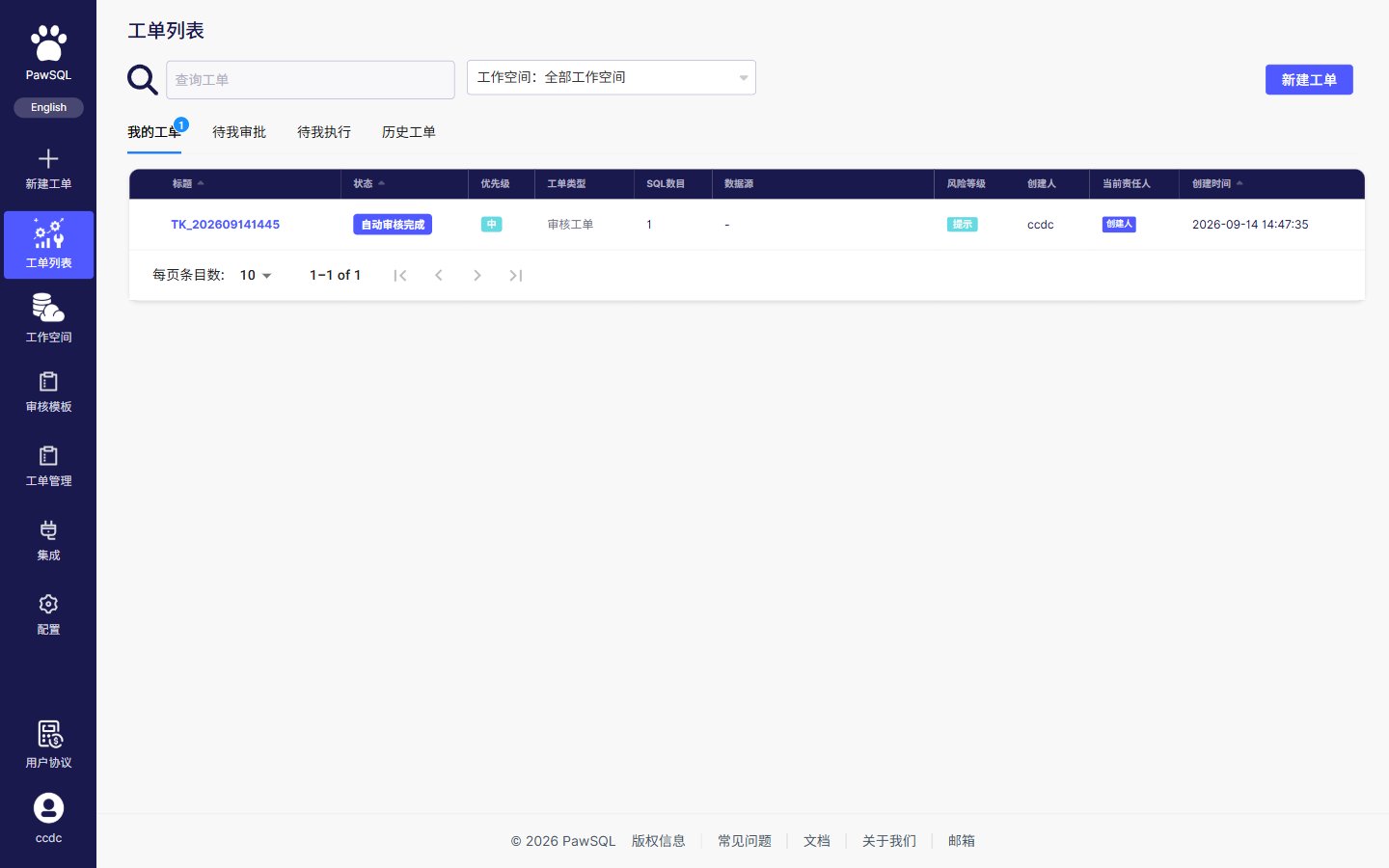
The ticket list groups work through filter tabs—My tickets, Pending my approval, Pending my execution, and History—with an additional workspace dropdown. List columns are: title, status, priority, ticket type, statement count, data source, risk grade, creator, current owner, and creation time.
 Available filters vary by PawSQL version, but may include:
* ticket title or identifier;
* project, organization, or workspace;
* database engine and version;
* creator, assignee, reviewer, or approver;
* ticket status and severity;
* creation or completion time;
* review policy or rule.
After opening a result, confirm that it contains the intended SQL and target environment. Similar ticket names are not enough to establish identity.
## Reconstruct the review
| Record | Why it matters |
| ---------------------------- | -------------------------------------------------- |
| Submitted SQL or source file | Establishes exactly what PawSQL reviewed |
| Database engine and version | Explains parsing and rule applicability |
| Review policy | Establishes active rules, severity, and thresholds |
| Workspace | Shows which object metadata informed the analysis |
| Task status | Confirms whether the full review completed |
| Findings and dispositions | Shows whether identified risks were closed |
| Activity and approval trail | Identifies who acted and why the change proceeded |
## Generate or export a report
Verify its name, SQL, project, environment, and completion time.
Clear temporary filters for a complete report, or document the intended filtered scope.
Confirm that the summary, findings, dispositions, and ticket configuration support the report’s purpose.
Use the report, download, or export capability provided by your PawSQL version.
Attach the evidence to the appropriate release, change, or audit record with suitable access and retention controls.
Report formats, fields, and export actions vary by PawSQL edition, licensing, and deployment model. If built-in export is unavailable, retain the ticket link and record the necessary summary and decision in the system of record.
## Recommended report contents
A formal review or audit report should capture:
* ticket identifier, creator, and timestamps;
* SQL source, database engine, version, and target environment;
* review policy and any available revision identifier;
* workspace and metadata freshness;
* completion status, statement count, and risk summary;
* findings, remediation, and accepted exceptions;
* reviewer or approver decision;
* related change ticket, validation evidence, and attachments.
## Compare two review runs
First verify that the database version, policy, and workspace are comparable. Then evaluate:
* changes in severity distribution;
* resolved, newly introduced, and accepted findings;
* changes in parse failures or uncovered statements;
* activity for critical rules;
* test and performance-validation evidence.
If policy or metadata changed, call that out explicitly. Do not attribute every difference to the SQL revision.
## Protect exported data
* Check SQL, object names, comments, and parameters for sensitive content.
* Grant report access only to people who need it.
* Do not distribute production SQL or schema details through uncontrolled channels.
* Apply organizational encryption, retention, and disposal requirements.
* Use a sanitized report for external sharing.
## Improve governance with review history
Trends such as frequently triggered rules, recurring patterns, remediation time, and exception volume can guide policy design, engineering standards, and training. Interpret metrics in the context of system criticality and workload size; avoid using raw counts as a simplistic team ranking.
## Expected Result
You obtain a report or export that captures the ticket configuration, findings, dispositions, and approval decision, ready to retain as evidence.
## Verification
Confirm the exported report includes the intended SQL, environment, policy, and decision, and that it is stored with appropriate access and retention controls.
## Related pages
Available filters vary by PawSQL version, but may include:
* ticket title or identifier;
* project, organization, or workspace;
* database engine and version;
* creator, assignee, reviewer, or approver;
* ticket status and severity;
* creation or completion time;
* review policy or rule.
After opening a result, confirm that it contains the intended SQL and target environment. Similar ticket names are not enough to establish identity.
## Reconstruct the review
| Record | Why it matters |
| ---------------------------- | -------------------------------------------------- |
| Submitted SQL or source file | Establishes exactly what PawSQL reviewed |
| Database engine and version | Explains parsing and rule applicability |
| Review policy | Establishes active rules, severity, and thresholds |
| Workspace | Shows which object metadata informed the analysis |
| Task status | Confirms whether the full review completed |
| Findings and dispositions | Shows whether identified risks were closed |
| Activity and approval trail | Identifies who acted and why the change proceeded |
## Generate or export a report
Verify its name, SQL, project, environment, and completion time.
Clear temporary filters for a complete report, or document the intended filtered scope.
Confirm that the summary, findings, dispositions, and ticket configuration support the report’s purpose.
Use the report, download, or export capability provided by your PawSQL version.
Attach the evidence to the appropriate release, change, or audit record with suitable access and retention controls.
Report formats, fields, and export actions vary by PawSQL edition, licensing, and deployment model. If built-in export is unavailable, retain the ticket link and record the necessary summary and decision in the system of record.
## Recommended report contents
A formal review or audit report should capture:
* ticket identifier, creator, and timestamps;
* SQL source, database engine, version, and target environment;
* review policy and any available revision identifier;
* workspace and metadata freshness;
* completion status, statement count, and risk summary;
* findings, remediation, and accepted exceptions;
* reviewer or approver decision;
* related change ticket, validation evidence, and attachments.
## Compare two review runs
First verify that the database version, policy, and workspace are comparable. Then evaluate:
* changes in severity distribution;
* resolved, newly introduced, and accepted findings;
* changes in parse failures or uncovered statements;
* activity for critical rules;
* test and performance-validation evidence.
If policy or metadata changed, call that out explicitly. Do not attribute every difference to the SQL revision.
## Protect exported data
* Check SQL, object names, comments, and parameters for sensitive content.
* Grant report access only to people who need it.
* Do not distribute production SQL or schema details through uncontrolled channels.
* Apply organizational encryption, retention, and disposal requirements.
* Use a sanitized report for external sharing.
## Improve governance with review history
Trends such as frequently triggered rules, recurring patterns, remediation time, and exception volume can guide policy design, engineering standards, and training. Interpret metrics in the context of system criticality and workload size; avoid using raw counts as a simplistic team ranking.
## Expected Result
You obtain a report or export that captures the ticket configuration, findings, dispositions, and approval decision, ready to retain as evidence.
## Verification
Confirm the exported report includes the intended SQL, environment, policy, and decision, and that it is stored with appropriate access and retention controls.
## Related pages