> ## Documentation Index
> Fetch the complete documentation index at: https://docs.pawsql.com/llms.txt
> Use this file to discover all available pages before exploring further.
> ## Agent Instructions
> PawSQL 是一个产品:Cloud 是公网部署形态,Engine / Optimizer / Auditor / Advisor / Patroller 是同一产品的组件与交付形态,不是彼此独立的产品。 / PawSQL is a single product: Cloud is the public deployment form, while Engine / Optimizer / Auditor / Advisor / Patroller are components and delivery forms of the same product, not separate products.
> 术语以站内术语表为准:SQL 审核对应英文 SQL Review,查询重写对应 Query Rewrite,索引推荐对应 Index Recommendation;英文内容统一用 Review,不用 Audit。 / Use the site glossary for terminology: 审核 is SQL Review, 重写 is Query Rewrite, 索引推荐 is Index Recommendation; English content uses Review, never Audit.
> 引用能力范围或版本支持时以对应页面为准;标注 unknown、或 status 非 published 的内容表示尚未经产品核实,不应作为事实引用。 / Cite capability scope and version support from the corresponding page; content marked unknown, or with a status other than published, is not yet product-verified and must not be cited as fact.
# Create a Review Ticket
> Fill in the title, database, review policy, priority, workspace, and SQL when creating a review ticket, then submit and track the review.
A review ticket binds a set of SQL statements to a database engine and version, a review policy, a priority, and an optional workspace, producing a traceable, reviewable record.
## Goal
Create a review ticket that binds a set of SQL statements to a database engine and version, review policy, priority, and optional workspace, producing a traceable record.
## Fill in the ticket fields
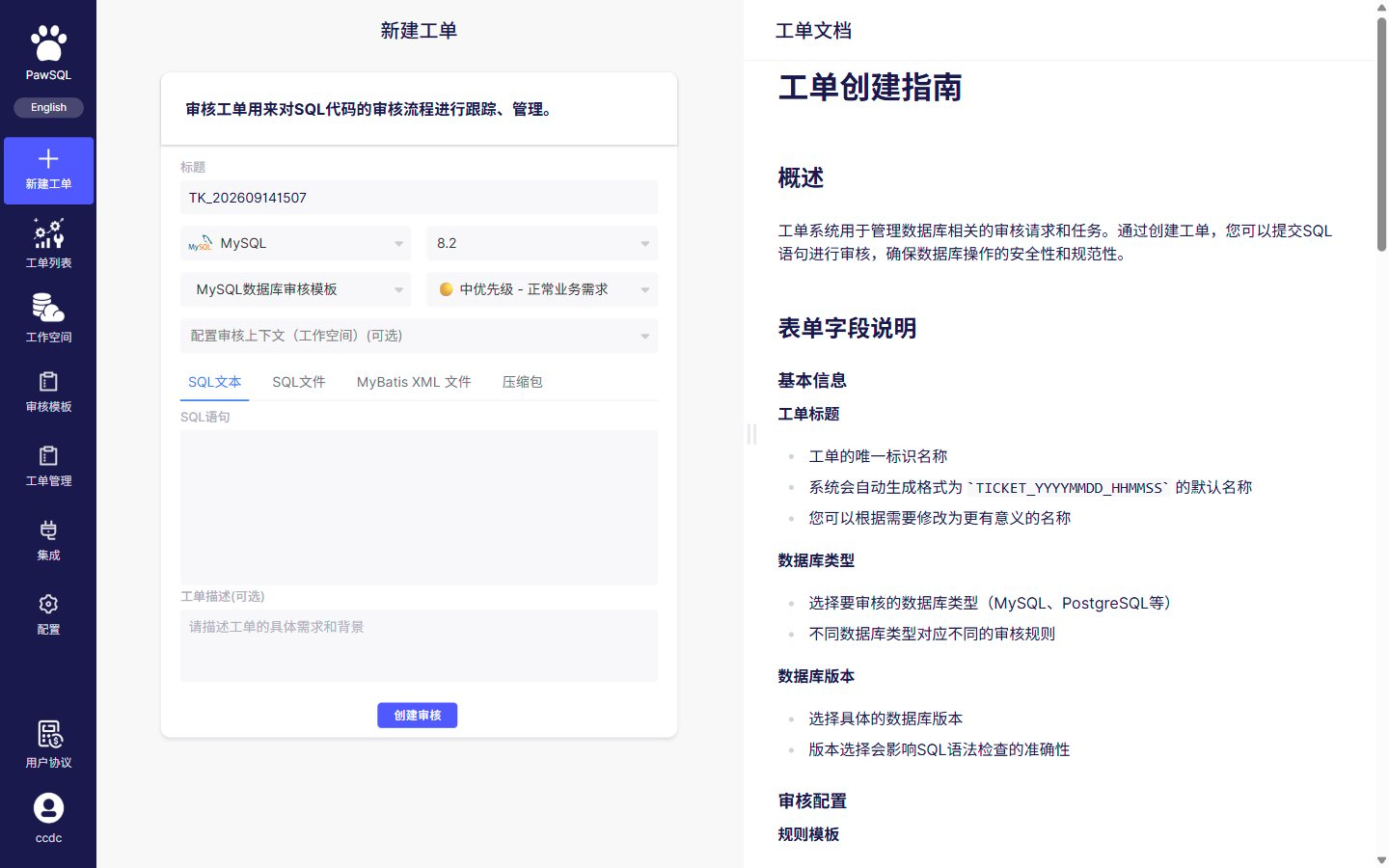 Creating a review ticket happens on a single page, in this order:
The title defaults to an auto-generated value based on creation time, for example `TK_202609141244`. You can replace it with a name that identifies the business system, change, and environment.
Select the engine and version where the SQL will run. The engine selects the SQL dialect and available rules; the version controls version-specific rules.
Pick a matching review policy from the dropdown (the interface may label it "review template"). The policy determines the enabled rules, severities, and thresholds. See [Review policy](/en/user-guide/sql-audit/select-audit-policy).
Select a ticket priority (low, medium, high, urgent). Priority drives ordering, handling, and gate decisions, and is independent of the severity computed after review.
Choose a workspace that matches the target environment when you need table, column, constraint, or index recognition, or optimization guidance. See [Workspace](/en/user-guide/sql-audit/configure-review-context).
Choose an input method (SQL text, SQL file, MyBatis XML file, or archive) and paste or upload the SQL under review.
Describe the ticket's purpose and background so reviewers understand the change.
Review the fields and submit to create the review ticket.
## Database engine and version
The engine and version are not just labels. They determine:
* which SQL dialect is parsed;
* which review rules are available;
* what parameter values a given rule uses;
* whether version-specific rules apply;
* whether database-specific syntax is recognized.
Do not select a different database or a higher version just to make the SQL parse.
## Whether to choose a workspace
| Scenario | Recommendation |
| -------------------------------------------------------- | ------------------------------------------------------- |
| Basic syntax and static convention checks only | You can skip the workspace |
| Recognizing tables, columns, and data types | Select a workspace |
| Checking primary keys, constraints, and existing indexes | Select a workspace |
| Index recommendations or fuller optimization guidance | Select a workspace |
| Database metadata is not yet available | Create a workspace from DDL, or accept reduced coverage |
## SQL input methods
| Input method | Typical use |
| ---------------- | ------------------------------------------------- |
| SQL text | One or a few statements, quick review |
| SQL file | Multi-statement scripts, database change packages |
| MyBatis XML file | SQL in MyBatis mapper files |
| Archive | Submitting multiple script files at once |
## SQL text requirements
* Use syntax consistent with the target database.
* Submit complete statements, not partial conditions or fragments.
* Separate multiple ordinary statements using a delimiter supported by the target database and your PawSQL edition.
* Keep comments that aid review, but remove passwords, tokens, and sensitive business data.
* Check that copying did not corrupt quotes, line breaks, or special characters.
* Do not include stack traces, application logs, or Markdown code fences.
## SQL file requirements
* Use a file type supported by the current edition.
* Use a character encoding supported by the product and agreed on by your team.
* Make sure files are not compressed, encrypted, or bundled with binary content (except when using the archive method).
* Check per-file and per-ticket size limits.
* Name files so the system, change, and version are identifiable.
* Run virus checks and data masking before uploading.
MyBatis XML files and archives are subject to the same file-level requirements; supported formats, package structure, and size limits depend on the current edition.
Ordinary multi-statement scripts usually separate statements with semicolons. Stored procedures, anonymous blocks, and some database scripts may contain internal semicolons or proprietary batch separators; follow the current PawSQL edition's support for the target database.
## Parameterized SQL
Application SQL may contain question-mark parameters, named parameters, or template expressions. Before submitting:
* Use a parameter form PawSQL supports.
* Preserve parameter data types and binding order.
* Replace real business data with masked values.
* Reduce a dynamic template that cannot be parsed to a single representative SQL statement.
* Prepare a representative parameter set when an execution plan is needed.
## Handling parse failures
1. Confirm the database engine and version.
2. Reduce to a single minimal SQL statement.
3. Check quotes, parentheses, comments, and delimiters.
4. Check variables, batch commands, and stored procedure syntax.
5. Confirm file encoding and invisible characters.
6. Record the PawSQL version, ticket number, line number, and full error message.
## Expected Result
After submission, the ticket enters a queued, running, or completed state with a detected statement count, and its review result can be tracked.
## Pre-submit checklist
* [ ] The ticket title (ticket number) is correct.
* [ ] The database engine and version are correct.
* [ ] The review policy is correct.
* [ ] The priority reflects reality.
* [ ] The detected statement count matches expectations.
* [ ] The workspace matches the target environment, or you explicitly skipped it.
* [ ] The SQL is masked and uses the correct statement delimiter.
* [ ] The ticket entered a queued, running, or completed state with no unexplained partial failure.
Record the review policy, priority, and workspace before submitting. If results change later, this lets you tell whether the SQL, the policy, or the metadata changed.
A review ticket is a static check and does not mean the SQL has been safely executed. Even after review passes, production scripts still require testing, backup, approval, and release control.
## Common problems
| Symptom | What to check first |
| -------------------------------- | ---------------------------------------------------------- |
| Wrong statement count | Delimiters, stored procedures, or script batch syntax |
| Tables or columns not recognized | Workspace, schema, metadata freshness |
| Ticket creation fails | Permissions, licensing, quotas, input size, service status |
| Ticket stays queued | Queue depth, concurrency limits, analysis service health |
## Related resources
Creating a review ticket happens on a single page, in this order:
The title defaults to an auto-generated value based on creation time, for example `TK_202609141244`. You can replace it with a name that identifies the business system, change, and environment.
Select the engine and version where the SQL will run. The engine selects the SQL dialect and available rules; the version controls version-specific rules.
Pick a matching review policy from the dropdown (the interface may label it "review template"). The policy determines the enabled rules, severities, and thresholds. See [Review policy](/en/user-guide/sql-audit/select-audit-policy).
Select a ticket priority (low, medium, high, urgent). Priority drives ordering, handling, and gate decisions, and is independent of the severity computed after review.
Choose a workspace that matches the target environment when you need table, column, constraint, or index recognition, or optimization guidance. See [Workspace](/en/user-guide/sql-audit/configure-review-context).
Choose an input method (SQL text, SQL file, MyBatis XML file, or archive) and paste or upload the SQL under review.
Describe the ticket's purpose and background so reviewers understand the change.
Review the fields and submit to create the review ticket.
## Database engine and version
The engine and version are not just labels. They determine:
* which SQL dialect is parsed;
* which review rules are available;
* what parameter values a given rule uses;
* whether version-specific rules apply;
* whether database-specific syntax is recognized.
Do not select a different database or a higher version just to make the SQL parse.
## Whether to choose a workspace
| Scenario | Recommendation |
| -------------------------------------------------------- | ------------------------------------------------------- |
| Basic syntax and static convention checks only | You can skip the workspace |
| Recognizing tables, columns, and data types | Select a workspace |
| Checking primary keys, constraints, and existing indexes | Select a workspace |
| Index recommendations or fuller optimization guidance | Select a workspace |
| Database metadata is not yet available | Create a workspace from DDL, or accept reduced coverage |
## SQL input methods
| Input method | Typical use |
| ---------------- | ------------------------------------------------- |
| SQL text | One or a few statements, quick review |
| SQL file | Multi-statement scripts, database change packages |
| MyBatis XML file | SQL in MyBatis mapper files |
| Archive | Submitting multiple script files at once |
## SQL text requirements
* Use syntax consistent with the target database.
* Submit complete statements, not partial conditions or fragments.
* Separate multiple ordinary statements using a delimiter supported by the target database and your PawSQL edition.
* Keep comments that aid review, but remove passwords, tokens, and sensitive business data.
* Check that copying did not corrupt quotes, line breaks, or special characters.
* Do not include stack traces, application logs, or Markdown code fences.
## SQL file requirements
* Use a file type supported by the current edition.
* Use a character encoding supported by the product and agreed on by your team.
* Make sure files are not compressed, encrypted, or bundled with binary content (except when using the archive method).
* Check per-file and per-ticket size limits.
* Name files so the system, change, and version are identifiable.
* Run virus checks and data masking before uploading.
MyBatis XML files and archives are subject to the same file-level requirements; supported formats, package structure, and size limits depend on the current edition.
Ordinary multi-statement scripts usually separate statements with semicolons. Stored procedures, anonymous blocks, and some database scripts may contain internal semicolons or proprietary batch separators; follow the current PawSQL edition's support for the target database.
## Parameterized SQL
Application SQL may contain question-mark parameters, named parameters, or template expressions. Before submitting:
* Use a parameter form PawSQL supports.
* Preserve parameter data types and binding order.
* Replace real business data with masked values.
* Reduce a dynamic template that cannot be parsed to a single representative SQL statement.
* Prepare a representative parameter set when an execution plan is needed.
## Handling parse failures
1. Confirm the database engine and version.
2. Reduce to a single minimal SQL statement.
3. Check quotes, parentheses, comments, and delimiters.
4. Check variables, batch commands, and stored procedure syntax.
5. Confirm file encoding and invisible characters.
6. Record the PawSQL version, ticket number, line number, and full error message.
## Expected Result
After submission, the ticket enters a queued, running, or completed state with a detected statement count, and its review result can be tracked.
## Pre-submit checklist
* [ ] The ticket title (ticket number) is correct.
* [ ] The database engine and version are correct.
* [ ] The review policy is correct.
* [ ] The priority reflects reality.
* [ ] The detected statement count matches expectations.
* [ ] The workspace matches the target environment, or you explicitly skipped it.
* [ ] The SQL is masked and uses the correct statement delimiter.
* [ ] The ticket entered a queued, running, or completed state with no unexplained partial failure.
Record the review policy, priority, and workspace before submitting. If results change later, this lets you tell whether the SQL, the policy, or the metadata changed.
A review ticket is a static check and does not mean the SQL has been safely executed. Even after review passes, production scripts still require testing, backup, approval, and release control.
## Common problems
| Symptom | What to check first |
| -------------------------------- | ---------------------------------------------------------- |
| Wrong statement count | Delimiters, stored procedures, or script batch syntax |
| Tables or columns not recognized | Workspace, schema, metadata freshness |
| Ticket creation fails | Permissions, licensing, quotas, input size, service status |
| Ticket stays queued | Queue depth, concurrency limits, analysis service health |
## Related resources