> ## Documentation Index
> Fetch the complete documentation index at: https://docs.pawsql.com/llms.txt
> Use this file to discover all available pages before exploring further.
> ## Agent Instructions
> PawSQL 是一个产品:Cloud 是公网部署形态,Engine / Optimizer / Auditor / Advisor / Patroller 是同一产品的组件与交付形态,不是彼此独立的产品。 / PawSQL is a single product: Cloud is the public deployment form, while Engine / Optimizer / Auditor / Advisor / Patroller are components and delivery forms of the same product, not separate products.
> 术语以站内术语表为准:SQL 审核对应英文 SQL Review,查询重写对应 Query Rewrite,索引推荐对应 Index Recommendation;英文内容统一用 Review,不用 Audit。 / Use the site glossary for terminology: 审核 is SQL Review, 重写 is Query Rewrite, 索引推荐 is Index Recommendation; English content uses Review, never Audit.
> 引用能力范围或版本支持时以对应页面为准;标注 unknown、或 status 非 published 的内容表示尚未经产品核实,不应作为事实引用。 / Cite capability scope and version support from the corresponding page; content marked unknown, or with a status other than published, is not yet product-verified and must not be cited as fact.
# Configure the SQL Quality Gate
> Configure the approval workflow and the risk-level threshold (Notice, Warning, Critical) to set the maximum risk level for ticket creation and establish a SQL quality gate.
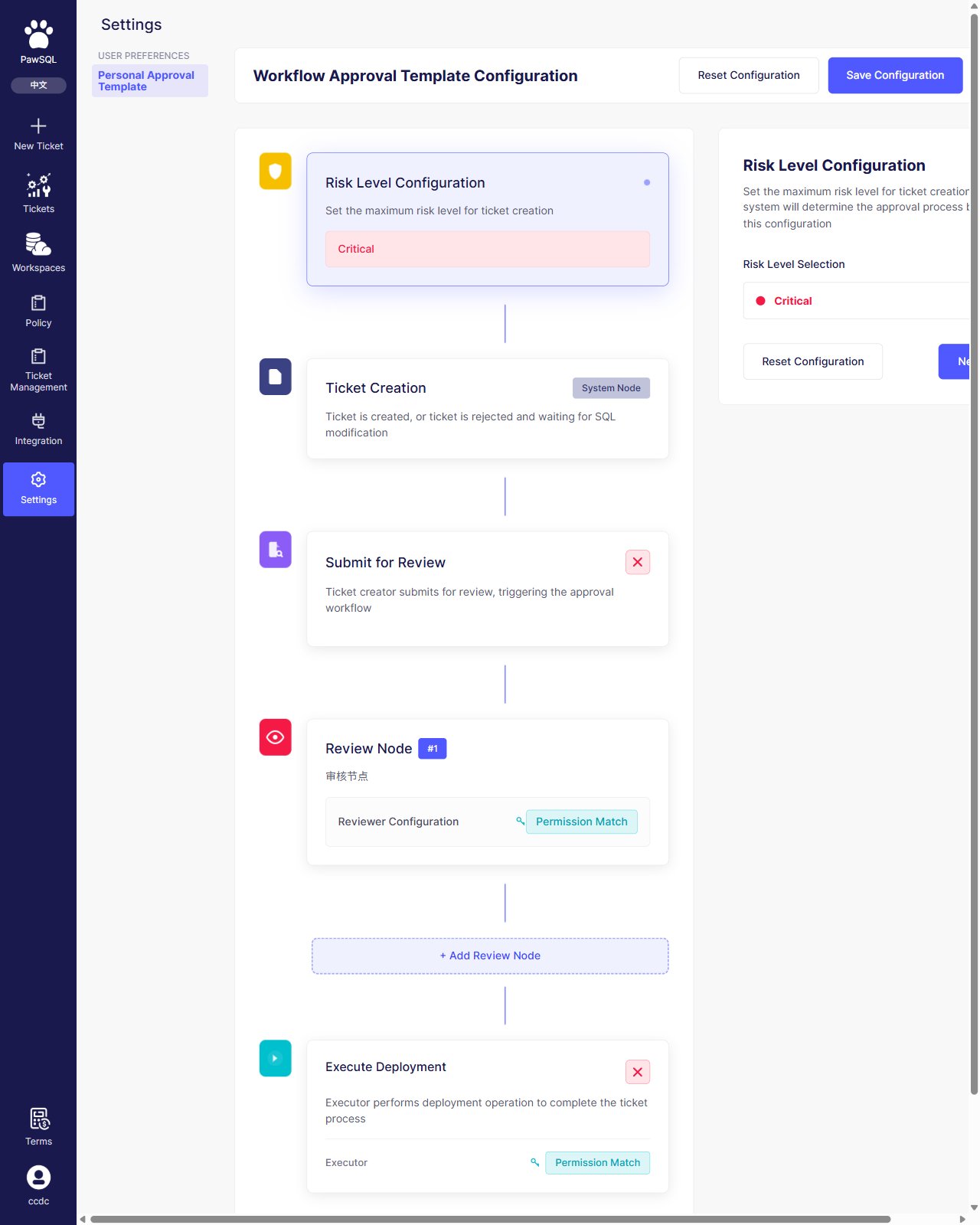
The SQL quality gate is implemented through the approval workflow configuration: in "Settings → Personal Approval Template", set the maximum risk level allowed for ticket creation; the system determines the approval process accordingly.
## Goal
Configure the approval workflow and the risk-level threshold (Notice, Warning, Critical) to set the maximum risk level for ticket creation and establish a SQL quality gate.
## Prerequisites
Access to the "Settings → Personal Approval Template" configuration page and permission to save the approval workflow.
 ## Risk level
Risk level applies to the whole ticket, with three levels from lightest to most severe:
| Risk level | Relative weight |
| ---------- | --------------- |
| Notice | Lightest |
| Warning | Medium |
| Critical | Most severe |
"Risk Level Configuration" sets the maximum risk level for ticket creation; tickets above that level require a stricter approval flow.
## Rule severity vs. risk level
"Rule severity" and "risk level" are two different dimensions; do not confuse them:
| Dimension | Applies to | Values |
| ------------- | ---------------- | --------------------------- |
| Rule severity | A single rule | notice / warning / critical |
| Risk level | The whole ticket | Notice / Warning / Critical |
Rule severity marks how serious a single finding is, see [Manage Rules](/en/user-guide/rules-policy/configure-rules); risk level decides whether a ticket needs a stricter approval flow, configured on this page.
## Approval workflow nodes
The approval workflow proceeds through these nodes:
| Node | Description |
| ------------------------ | -------------------------------------------------------------------------------- |
| Risk Level Configuration | Set the maximum risk level for ticket creation |
| Ticket Creation | System node; the ticket is created, or rejected and waiting for SQL modification |
| Submit for Review | The ticket creator submits for review, triggering the approval workflow |
| Review Node | Configure reviewers; you can add multiple review nodes |
| Execute Deployment | Configure executors to complete the ticket process |
## Configuration steps
The approval workflow configuration is a multi-step wizard: configure the risk level first, then the review submission, review nodes, and deployment. Click "Save Configuration" when done. You can click "Reset Configuration" at any time to restore defaults.
## Verification
After saving, confirm that the approval workflow shows the configured nodes and that a ticket whose risk level exceeds the threshold requires the stricter approval flow you defined.
## Risk level
Risk level applies to the whole ticket, with three levels from lightest to most severe:
| Risk level | Relative weight |
| ---------- | --------------- |
| Notice | Lightest |
| Warning | Medium |
| Critical | Most severe |
"Risk Level Configuration" sets the maximum risk level for ticket creation; tickets above that level require a stricter approval flow.
## Rule severity vs. risk level
"Rule severity" and "risk level" are two different dimensions; do not confuse them:
| Dimension | Applies to | Values |
| ------------- | ---------------- | --------------------------- |
| Rule severity | A single rule | notice / warning / critical |
| Risk level | The whole ticket | Notice / Warning / Critical |
Rule severity marks how serious a single finding is, see [Manage Rules](/en/user-guide/rules-policy/configure-rules); risk level decides whether a ticket needs a stricter approval flow, configured on this page.
## Approval workflow nodes
The approval workflow proceeds through these nodes:
| Node | Description |
| ------------------------ | -------------------------------------------------------------------------------- |
| Risk Level Configuration | Set the maximum risk level for ticket creation |
| Ticket Creation | System node; the ticket is created, or rejected and waiting for SQL modification |
| Submit for Review | The ticket creator submits for review, triggering the approval workflow |
| Review Node | Configure reviewers; you can add multiple review nodes |
| Execute Deployment | Configure executors to complete the ticket process |
## Configuration steps
The approval workflow configuration is a multi-step wizard: configure the risk level first, then the review submission, review nodes, and deployment. Click "Save Configuration" when done. You can click "Reset Configuration" at any time to restore defaults.
## Verification
After saving, confirm that the approval workflow shows the configured nodes and that a ticket whose risk level exceeds the threshold requires the stricter approval flow you defined.