> ## Documentation Index
> Fetch the complete documentation index at: https://docs.pawsql.com/llms.txt
> Use this file to discover all available pages before exploring further.
> ## Agent Instructions
> PawSQL 是一个产品:Cloud 是公网部署形态,Engine / Optimizer / Auditor / Advisor / Patroller 是同一产品的组件与交付形态,不是彼此独立的产品。 / PawSQL is a single product: Cloud is the public deployment form, while Engine / Optimizer / Auditor / Advisor / Patroller are components and delivery forms of the same product, not separate products.
> 术语以站内术语表为准:SQL 审核对应英文 SQL Review,查询重写对应 Query Rewrite,索引推荐对应 Index Recommendation;英文内容统一用 Review,不用 Audit。 / Use the site glossary for terminology: 审核 is SQL Review, 重写 is Query Rewrite, 索引推荐 is Index Recommendation; English content uses Review, never Audit.
> 引用能力范围或版本支持时以对应页面为准;标注 unknown、或 status 非 published 的内容表示尚未经产品核实,不应作为事实引用。 / Cite capability scope and version support from the corresponding page; content marked unknown, or with a status other than published, is not yet product-verified and must not be cited as fact.
# Manage Rules
> Browse the built-in audit rules by category tree, severity filter, and search, and inspect each rule's enable state, category, severity, threshold, and parent node.
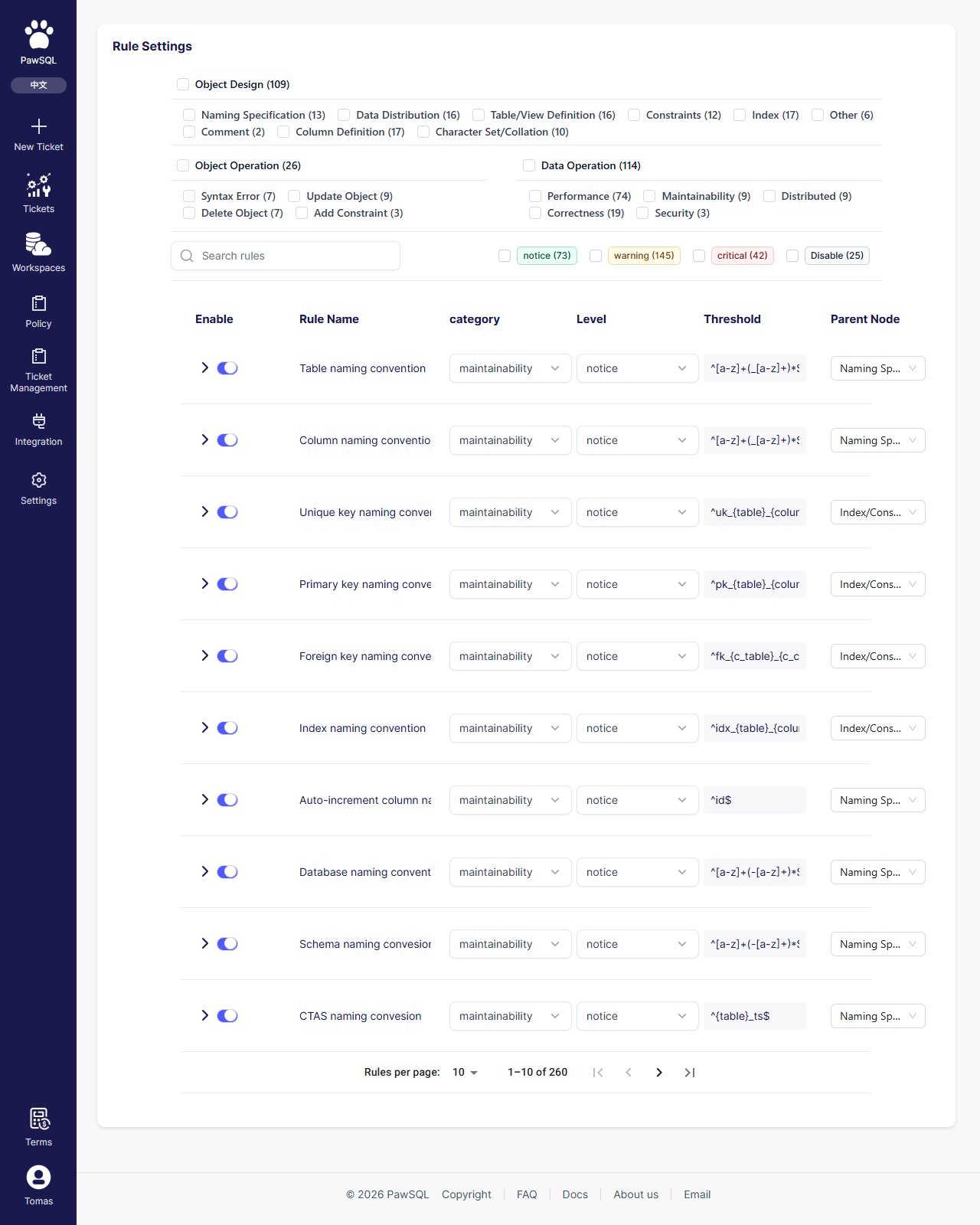
The Manage Rules page shows the Audit platform's built-in default rule template: 260 audit rules in total. It is separate from the "Rule configuration" step when creating a review policy — the former lets you browse the whole rule catalog, the latter lets you pick rules within one template.
## Goal
Browse the built-in audit rules by category tree, severity filter, and search, and inspect each rule's enable state, category, severity, threshold, and parent node.
## Prerequisites
No special prerequisites beyond access to the Audit platform's Manage Rules page.
 ## Page layout
* **Left**: category tree (top-level category → subcategory), severity filter (notice / warning / critical / Disable), and search box;
* **Right**: rule table with the columns Enable, Rule Name, Category, Level, Threshold, and Parent Node.
## Rule categories
Rules are organized into three top-level categories — Object Design, Object Operation, and Data Operation — each divided into subcategories:
| Top-level | Subcategories |
| ---------------- | ---------------------------------------------------------------------------------------------------------------------------------------------- |
| Object Design | Naming Specification, Data Distribution, Table/View Definition, Constraints, Index, Other, Comment, Column Definition, Character Set/Collation |
| Object Operation | Syntax Error, Update Object, Delete Object, Add Constraint |
| Data Operation | Performance, Maintainability, Distributed, Correctness, Security |
## Locate rules
* **Category tree**: click a category or subcategory to filter rules in it;
* **Severity filter**: filter by notice / warning / critical / Disable;
* **Search**: type a rule-name keyword in the search box.
## Rule severity
Each audit rule has a severity that marks how serious its findings are, in three levels from lightest to most severe: notice, warning, critical.
## Rule table columns
| Column | Description |
| ----------- | ---------------------------------------------------------------------------------------------- |
| Enable | Whether the rule is enabled |
| Rule Name | The rule name |
| Category | The category the rule belongs to |
| Level | The rule severity (notice / warning / critical) |
| Threshold | The rule parameter; a regular expression for naming-convention rules |
| Parent Node | The parent rule in the hierarchy (rules are hierarchical, and a child rule refines its parent) |
## Thresholds
The form of a rule's threshold depends on the rule. Naming-convention rules use a regular expression to constrain object-name format:
| Rule | Default threshold |
| --------------------------------------- | -------------------------------------------------- |
| Table naming convention | `^[a-z]+(_[a-z]+)*$` |
| Column naming convention | `^[a-z]+(_[a-z]+)*$` |
| Unique key naming convention | `^uk_{table}_{columns}$` |
| Primary key naming convention | `^pk_{table}_{columns}$` |
| Foreign key naming convention | `^fk_{c_table}_{c_columns}_{p_table}_{p_columns}$` |
| Index naming convention | `^idx_{table}_{columns}$` |
| Auto-increment column naming convention | `^id$` |
| Database naming convention | `^[a-z]+(-[a-z]+)*$` |
| Schema naming convention | `^[a-z]+(-[a-z]+)*$` |
Rules and thresholds in the built-in default template are read-only. To customize them, first create a local template from a global template (see [Manage Review Policies](/en/user-guide/rules-policy/rule-sets)), then enable, disable, or adjust rules on the local template.
## Verification
Confirm the page works by selecting a category, applying a severity filter, or searching a rule name, and checking that the rule table updates to show the matching rules with their enable state, category, level, threshold, and parent node.
## Page layout
* **Left**: category tree (top-level category → subcategory), severity filter (notice / warning / critical / Disable), and search box;
* **Right**: rule table with the columns Enable, Rule Name, Category, Level, Threshold, and Parent Node.
## Rule categories
Rules are organized into three top-level categories — Object Design, Object Operation, and Data Operation — each divided into subcategories:
| Top-level | Subcategories |
| ---------------- | ---------------------------------------------------------------------------------------------------------------------------------------------- |
| Object Design | Naming Specification, Data Distribution, Table/View Definition, Constraints, Index, Other, Comment, Column Definition, Character Set/Collation |
| Object Operation | Syntax Error, Update Object, Delete Object, Add Constraint |
| Data Operation | Performance, Maintainability, Distributed, Correctness, Security |
## Locate rules
* **Category tree**: click a category or subcategory to filter rules in it;
* **Severity filter**: filter by notice / warning / critical / Disable;
* **Search**: type a rule-name keyword in the search box.
## Rule severity
Each audit rule has a severity that marks how serious its findings are, in three levels from lightest to most severe: notice, warning, critical.
## Rule table columns
| Column | Description |
| ----------- | ---------------------------------------------------------------------------------------------- |
| Enable | Whether the rule is enabled |
| Rule Name | The rule name |
| Category | The category the rule belongs to |
| Level | The rule severity (notice / warning / critical) |
| Threshold | The rule parameter; a regular expression for naming-convention rules |
| Parent Node | The parent rule in the hierarchy (rules are hierarchical, and a child rule refines its parent) |
## Thresholds
The form of a rule's threshold depends on the rule. Naming-convention rules use a regular expression to constrain object-name format:
| Rule | Default threshold |
| --------------------------------------- | -------------------------------------------------- |
| Table naming convention | `^[a-z]+(_[a-z]+)*$` |
| Column naming convention | `^[a-z]+(_[a-z]+)*$` |
| Unique key naming convention | `^uk_{table}_{columns}$` |
| Primary key naming convention | `^pk_{table}_{columns}$` |
| Foreign key naming convention | `^fk_{c_table}_{c_columns}_{p_table}_{p_columns}$` |
| Index naming convention | `^idx_{table}_{columns}$` |
| Auto-increment column naming convention | `^id$` |
| Database naming convention | `^[a-z]+(-[a-z]+)*$` |
| Schema naming convention | `^[a-z]+(-[a-z]+)*$` |
Rules and thresholds in the built-in default template are read-only. To customize them, first create a local template from a global template (see [Manage Review Policies](/en/user-guide/rules-policy/rule-sets)), then enable, disable, or adjust rules on the local template.
## Verification
Confirm the page works by selecting a category, applying a severity filter, or searching a rule name, and checking that the rule table updates to show the matching rules with their enable state, category, level, threshold, and parent node.