> ## Documentation Index
> Fetch the complete documentation index at: https://docs.pawsql.com/llms.txt
> Use this file to discover all available pages before exploring further.
> ## Agent Instructions
> PawSQL 是一个产品:Cloud 是公网部署形态,Engine / Optimizer / Auditor / Advisor / Patroller 是同一产品的组件与交付形态,不是彼此独立的产品。 / PawSQL is a single product: Cloud is the public deployment form, while Engine / Optimizer / Auditor / Advisor / Patroller are components and delivery forms of the same product, not separate products.
> 术语以站内术语表为准:SQL 审核对应英文 SQL Review,查询重写对应 Query Rewrite,索引推荐对应 Index Recommendation;英文内容统一用 Review,不用 Audit。 / Use the site glossary for terminology: 审核 is SQL Review, 重写 is Query Rewrite, 索引推荐 is Index Recommendation; English content uses Review, never Audit.
> 引用能力范围或版本支持时以对应页面为准;标注 unknown、或 status 非 published 的内容表示尚未经产品核实,不应作为事实引用。 / Cite capability scope and version support from the corresponding page; content marked unknown, or with a status other than published, is not yet product-verified and must not be cited as fact.
# Patrol Task Report
> Review patrol summary, severity distribution, top audit rules, and top database objects on the Database objects page, and drill into each table's anomalies.
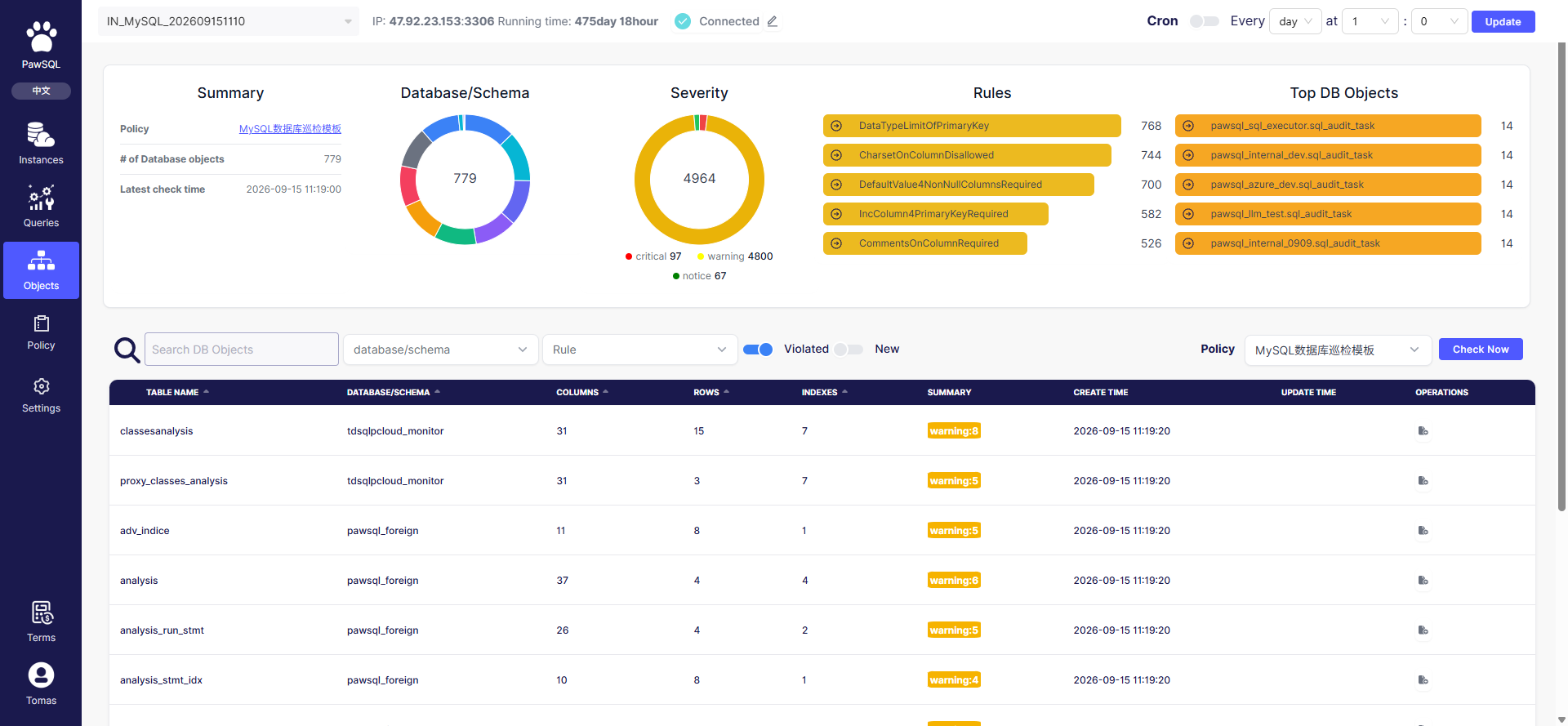
After patrol completes, the Database objects page summarizes the findings into a drillable patrol report. The report presents four layers — overview, risk distribution, top issues, and object list — to judge overall instance health and locate the objects most in need of attention.
 ## Goal
Review the patrol report on the Database objects page to judge instance health and locate the objects needing remediation.
## Prerequisites
A patrol has completed so the Database objects page has findings to summarize.
## Steps
Read the report top-down: the summary overview, the severity distribution, the top audit rules, the top database objects, and finally the drillable object list.
## Summary
| Metric | Meaning |
| --------------------- | ------------------------------------------------------- |
| Patrol template | The rule set used (e.g. MySQL database patrol template) |
| Database object count | Number of database objects (tables) covered |
| Latest patrol time | When the most recent patrol finished |
## Severity distribution
The "Severity" chart counts findings across three levels — critical / warning / notice. Real sample: of `4964` findings, `97` critical, `4800` warning, and `67` notice. Click a level to filter the object list by that severity.
## Top audit rules
The "Audit rules" chart lists the most frequently triggered rules, revealing common issues. In a real sample the top rules were:
| Rule | Findings |
| ------------------------------------------------- | -------- |
| Primary key column must use a specified data type | `768` |
| Column character set must not be specified | `744` |
| NOT NULL column must have a default value | `700` |
| Primary key should use an auto-increment column | `582` |
| Column must have a comment | `526` |
## Top database objects
The "Database objects" chart lists the objects (tables) with the most findings, to prioritize remediation. In a real sample, the `sql_audit_task` tables across `pawsql_*` databases each had `14` findings.
## Object list
The object table lists each table with structural information and patrol results:
| Column | Meaning |
| ----------------- | ---------------------------------------------- |
| Table | The database object (table) name |
| Database/schema | The schema the table belongs to |
| Columns | Column count |
| Rows | Row count |
| Indexes | Index count |
| Anomalies | The table's findings (e.g. "warning:8") |
| Created / Updated | When the patrol record was created and updated |
| Operations | Drill into the table's patrol details |
Above the table are filters: search database objects, database/schema, violated rules, and "Violated rules" and "New" toggles to show only objects with issues or newly added objects.
## Expected Result
The Database objects page shows the patrol summary, the severity chart, the audit rules chart, the database objects chart, and a filterable object list with each table's anomalies.
## Verification
Confirm the summary reflects the latest patrol, and that clicking a severity level or rule filters the object list accordingly.
## Related pages
* **Instance overview**: cross-instance metrics, 7-day slow SQL, and database patrol Top 5 — see [Performance Governance Workflow](/en/user-guide/performance/);
* **Patrol templates**: view and maintain the rule sets used for patrol;
* **Configuration**: maintain optimization-related global settings.
## FAQ
| Symptom | Check first |
| ------------------------------------- | --------------------------------------------------------- |
| Empty report | Whether a patrol has completed, view permission |
| Zero severity | Whether template rules are enabled, database/schema scope |
| Object count differs from expectation | Database/schema selection, metadata read permission |
## Related reading
## Goal
Review the patrol report on the Database objects page to judge instance health and locate the objects needing remediation.
## Prerequisites
A patrol has completed so the Database objects page has findings to summarize.
## Steps
Read the report top-down: the summary overview, the severity distribution, the top audit rules, the top database objects, and finally the drillable object list.
## Summary
| Metric | Meaning |
| --------------------- | ------------------------------------------------------- |
| Patrol template | The rule set used (e.g. MySQL database patrol template) |
| Database object count | Number of database objects (tables) covered |
| Latest patrol time | When the most recent patrol finished |
## Severity distribution
The "Severity" chart counts findings across three levels — critical / warning / notice. Real sample: of `4964` findings, `97` critical, `4800` warning, and `67` notice. Click a level to filter the object list by that severity.
## Top audit rules
The "Audit rules" chart lists the most frequently triggered rules, revealing common issues. In a real sample the top rules were:
| Rule | Findings |
| ------------------------------------------------- | -------- |
| Primary key column must use a specified data type | `768` |
| Column character set must not be specified | `744` |
| NOT NULL column must have a default value | `700` |
| Primary key should use an auto-increment column | `582` |
| Column must have a comment | `526` |
## Top database objects
The "Database objects" chart lists the objects (tables) with the most findings, to prioritize remediation. In a real sample, the `sql_audit_task` tables across `pawsql_*` databases each had `14` findings.
## Object list
The object table lists each table with structural information and patrol results:
| Column | Meaning |
| ----------------- | ---------------------------------------------- |
| Table | The database object (table) name |
| Database/schema | The schema the table belongs to |
| Columns | Column count |
| Rows | Row count |
| Indexes | Index count |
| Anomalies | The table's findings (e.g. "warning:8") |
| Created / Updated | When the patrol record was created and updated |
| Operations | Drill into the table's patrol details |
Above the table are filters: search database objects, database/schema, violated rules, and "Violated rules" and "New" toggles to show only objects with issues or newly added objects.
## Expected Result
The Database objects page shows the patrol summary, the severity chart, the audit rules chart, the database objects chart, and a filterable object list with each table's anomalies.
## Verification
Confirm the summary reflects the latest patrol, and that clicking a severity level or rule filters the object list accordingly.
## Related pages
* **Instance overview**: cross-instance metrics, 7-day slow SQL, and database patrol Top 5 — see [Performance Governance Workflow](/en/user-guide/performance/);
* **Patrol templates**: view and maintain the rule sets used for patrol;
* **Configuration**: maintain optimization-related global settings.
## FAQ
| Symptom | Check first |
| ------------------------------------- | --------------------------------------------------------- |
| Empty report | Whether a patrol has completed, view permission |
| Zero severity | Whether template rules are enabled, database/schema scope |
| Object count differs from expectation | Database/schema selection, metadata read permission |
## Related reading