> ## Documentation Index
> Fetch the complete documentation index at: https://docs.pawsql.com/llms.txt
> Use this file to discover all available pages before exploring further.
> ## Agent Instructions
> PawSQL 是一个产品:Cloud 是公网部署形态,Engine / Optimizer / Auditor / Advisor / Patroller 是同一产品的组件与交付形态,不是彼此独立的产品。 / PawSQL is a single product: Cloud is the public deployment form, while Engine / Optimizer / Auditor / Advisor / Patroller are components and delivery forms of the same product, not separate products.
> 术语以站内术语表为准:SQL 审核对应英文 SQL Review,查询重写对应 Query Rewrite,索引推荐对应 Index Recommendation;英文内容统一用 Review,不用 Audit。 / Use the site glossary for terminology: 审核 is SQL Review, 重写 is Query Rewrite, 索引推荐 is Index Recommendation; English content uses Review, never Audit.
> 引用能力范围或版本支持时以对应页面为准;标注 unknown、或 status 非 published 的内容表示尚未经产品核实,不应作为事实引用。 / Cite capability scope and version support from the corresponding page; content marked unknown, or with a status other than published, is not yet product-verified and must not be cited as fact.
# Object Patrol Task
> Select a patrol template in the patrol config step to complete instance patrol setup, then check database objects for structural risks via manual or scheduled patrol.
Performance patrol (database object patrol) applies the audit rules in a patrol template to the instance's database objects (tables), identifying structural defects, naming violations, missing comments, and other risks. It is configured in the "Patrol config" step of the add-instance wizard, and can be triggered manually or on a schedule from the Database objects page after onboarding.
## Goal
Check database objects for structural risks by applying the audit rules from a patrol template.
## Prerequisites
Slow query config has passed and a patrol template matching the target database type is available.
## Patrol config step
After slow query config passes, the wizard enters "Patrol config". This step selects the patrol template (rule set) used for patrol.
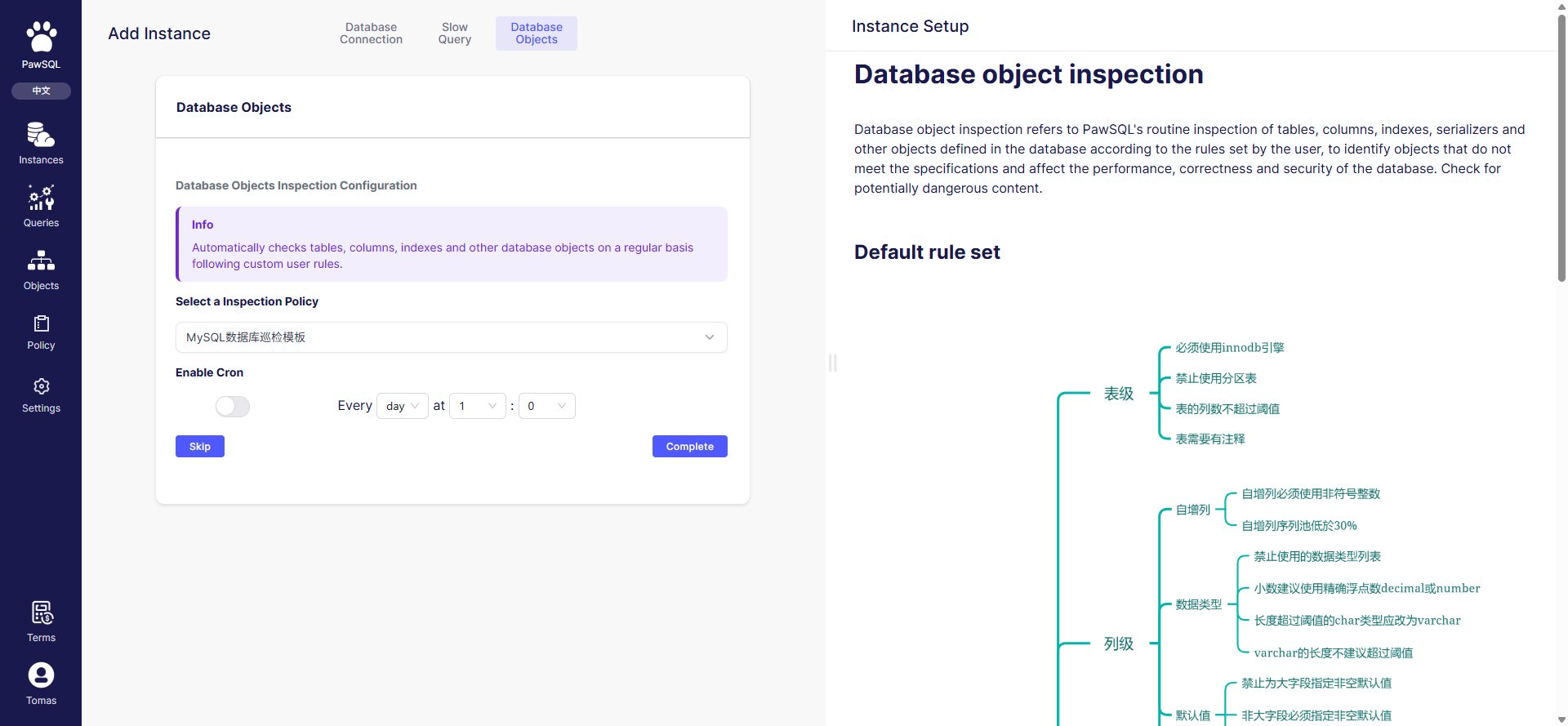 The patrol template determines the audit rules and severities applied during patrol. Templates are provided per database type (such as "MySQL database patrol template") and share the same rule system as the Audit platform's rule templates.
## Manual patrol
After onboarding, click "Patrol" on the Database objects page to trigger a patrol immediately. Patrol runs server-side, and the summary and object list update when it finishes.
The patrol template determines the audit rules and severities applied during patrol. Templates are provided per database type (such as "MySQL database patrol template") and share the same rule system as the Audit platform's rule templates.
## Manual patrol
After onboarding, click "Patrol" on the Database objects page to trigger a patrol immediately. Patrol runs server-side, and the summary and object list update when it finishes.
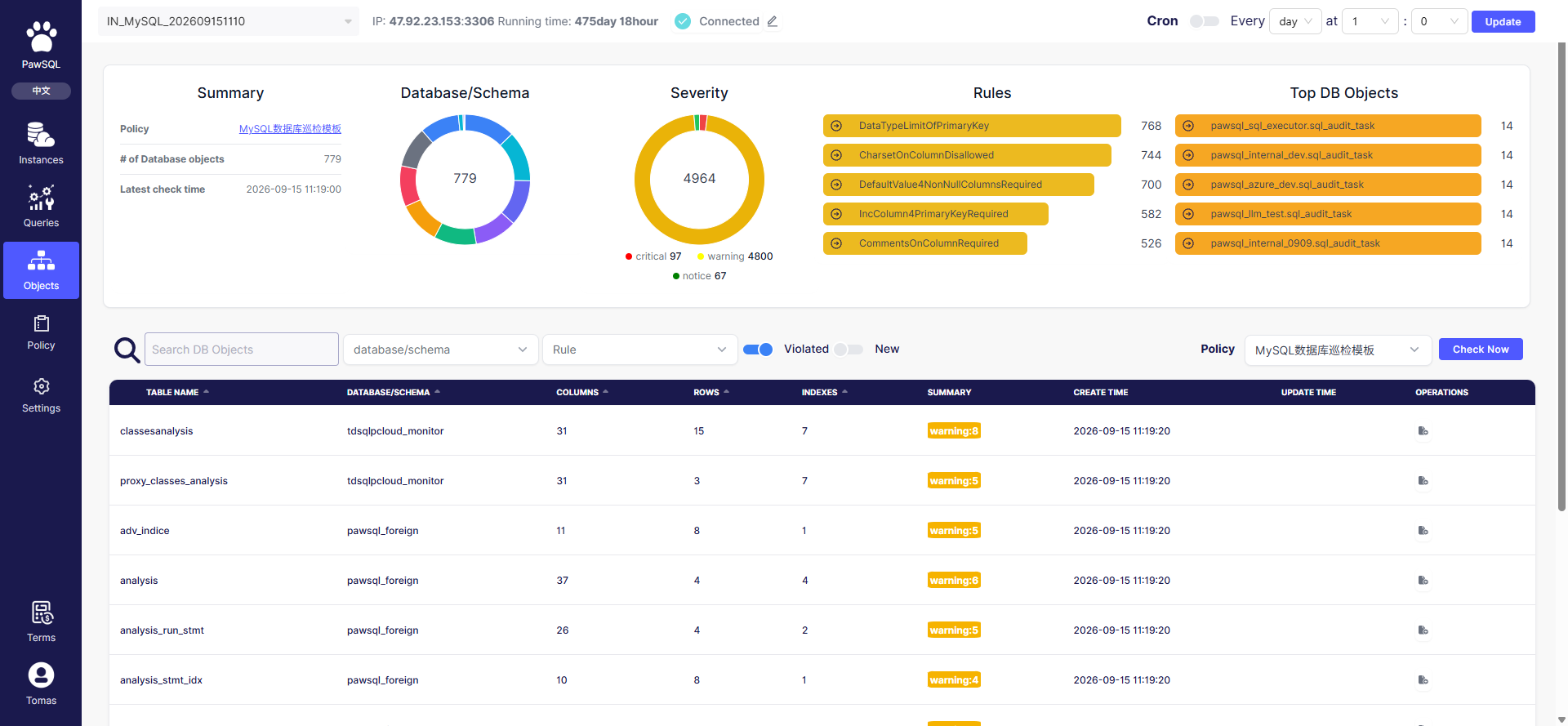 After patrol, the summary shows the result (from a real sample):
| Metric | Sample value | Meaning |
| --------------------- | ------------------------------ | ------------------------------------------- |
| Patrol template | MySQL database patrol template | The rule set used |
| Database object count | `779` | Number of database objects (tables) covered |
| Latest patrol time | `2026-09-15 11:19:00` | When the most recent patrol finished |
## Scheduled patrol
At the top of the Database objects page, turn on "Scheduled patrol", set the interval (every N days) and time (at HH:MM), then click "Update". The platform then patrols automatically on schedule.
## Interpreting results
Patrol results are summarized by severity and rule — see [Patrol Task Report](/en/user-guide/performance/reports).
## Before you submit
* [ ] The patrol template matches the target database type;
* [ ] The rules enabled in the template match the governance goal;
* [ ] The summary updates after manual patrol;
* [ ] Scheduled patrol avoids business peak hours if needed.
## FAQ
| Symptom | Check first |
| -------------------------------- | --------------------------------------------------- |
| No patrol template available | Database type, template visibility |
| Zero objects patrolled | Database/schema selection, metadata read permission |
| Results differ from expectations | Rules enabled in the template, rule thresholds |
## Related reading
After patrol, the summary shows the result (from a real sample):
| Metric | Sample value | Meaning |
| --------------------- | ------------------------------ | ------------------------------------------- |
| Patrol template | MySQL database patrol template | The rule set used |
| Database object count | `779` | Number of database objects (tables) covered |
| Latest patrol time | `2026-09-15 11:19:00` | When the most recent patrol finished |
## Scheduled patrol
At the top of the Database objects page, turn on "Scheduled patrol", set the interval (every N days) and time (at HH:MM), then click "Update". The platform then patrols automatically on schedule.
## Interpreting results
Patrol results are summarized by severity and rule — see [Patrol Task Report](/en/user-guide/performance/reports).
## Before you submit
* [ ] The patrol template matches the target database type;
* [ ] The rules enabled in the template match the governance goal;
* [ ] The summary updates after manual patrol;
* [ ] Scheduled patrol avoids business peak hours if needed.
## FAQ
| Symptom | Check first |
| -------------------------------- | --------------------------------------------------- |
| No patrol template available | Database type, template visibility |
| Zero objects patrolled | Database/schema selection, metadata read permission |
| Results differ from expectations | Rules enabled in the template, rule thresholds |
## Related reading