> ## Documentation Index
> Fetch the complete documentation index at: https://docs.pawsql.com/llms.txt
> Use this file to discover all available pages before exploring further.
> ## Agent Instructions
> PawSQL 是一个产品:Cloud 是公网部署形态,Engine / Optimizer / Auditor / Advisor / Patroller 是同一产品的组件与交付形态,不是彼此独立的产品。 / PawSQL is a single product: Cloud is the public deployment form, while Engine / Optimizer / Auditor / Advisor / Patroller are components and delivery forms of the same product, not separate products.
> 术语以站内术语表为准:SQL 审核对应英文 SQL Review,查询重写对应 Query Rewrite,索引推荐对应 Index Recommendation;英文内容统一用 Review,不用 Audit。 / Use the site glossary for terminology: 审核 is SQL Review, 重写 is Query Rewrite, 索引推荐 is Index Recommendation; English content uses Review, never Audit.
> 引用能力范围或版本支持时以对应页面为准;标注 unknown、或 status 非 published 的内容表示尚未经产品核实,不应作为事实引用。 / Cite capability scope and version support from the corresponding page; content marked unknown, or with a status other than published, is not yet product-verified and must not be cited as fact.
# Create a Patrol Issue Ticket
> Bundle objects with anomalies from the patrol report into a patrol issue ticket, confirm the title, priority, and associated objects, then submit for remediation tracking.
The patrol report answers "which objects have problems"; a patrol issue ticket turns those problems into a trackable, reviewable remediation task. It starts from the object list in the [Patrol Task Report](/en/user-guide/performance/reports), bundling objects with anomalies into a single ticket to synchronize remediation ownership and progress across the team.
## Goal
Turn patrol report anomalies into a trackable, reviewable remediation ticket.
## Prerequisites
A patrol has completed and produced objects with anomalies on the Database objects page.
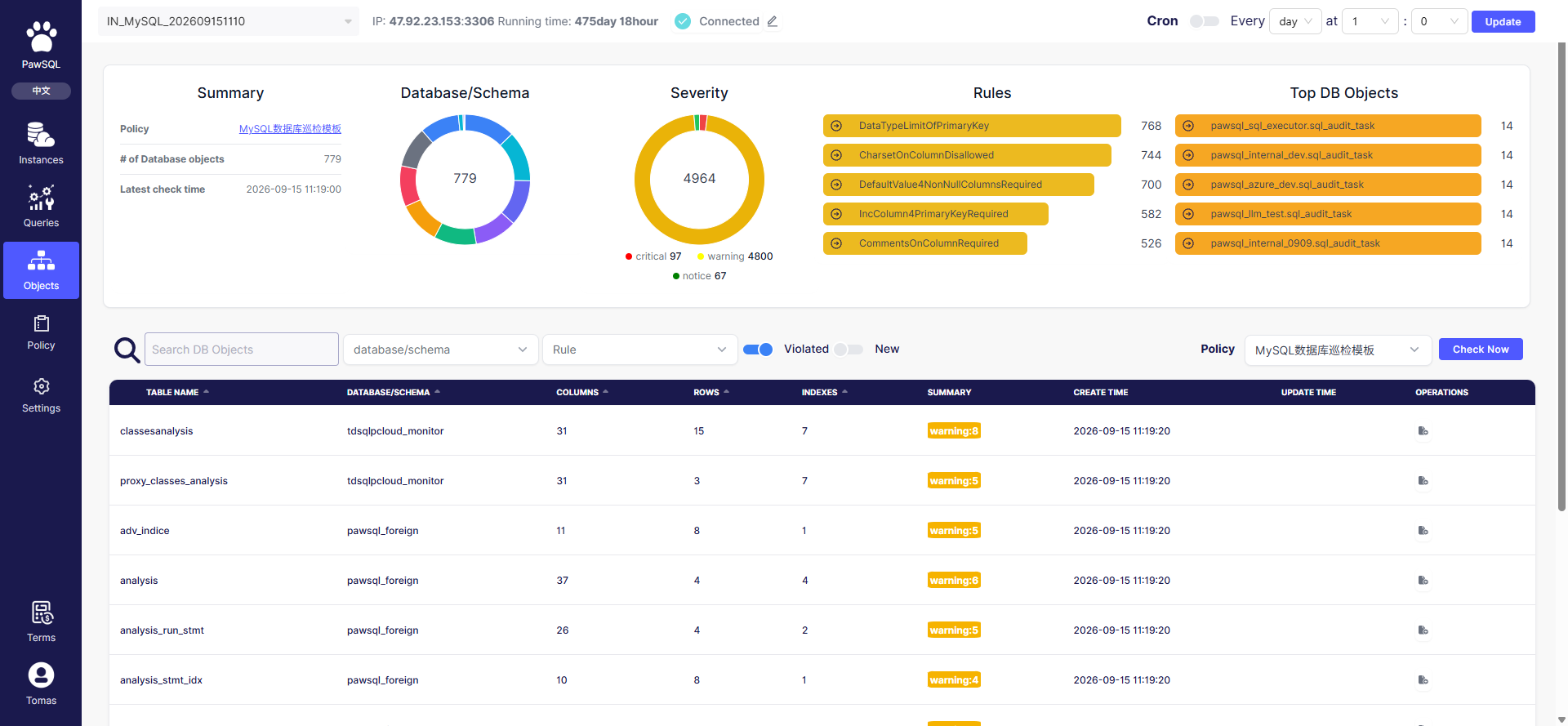
## Start from the object list
After patrol completes, locate objects with anomalies in the object list on the Database objects page — filter by "Violated rules" or by severity (critical / warning / notice). Select the objects to remediate and create a ticket that includes those objects and their anomalies.
 ## Ticket information
When creating a patrol issue ticket, confirm the following:
| Item | Meaning |
| ------------------ | -------------------------------------------------------------------------------- |
| Title | Ticket name; include the instance, database, and issue scope for easy lookup |
| Priority | Remediation priority (low, medium, high, urgent), used for ordering and handling |
| Associated objects | The problem objects (tables) covered, with their severity and anomaly count |
## Submit and track
After submission, the ticket enters the remediation flow. Remediation progress follows the governance "pending → in progress → resolved" stages — see [Track Governance Progress](/en/user-guide/performance/track-progress).
## Expected Result
After submission, the patrol issue ticket enters the remediation flow with its title, priority, and associated objects recorded.
## Verification
Confirm the ticket appears in the remediation flow and its progress follows the pending → in progress → resolved stages.
## FAQ
| Symptom | Check first |
| ------------------------------------- | --------------------------------------------------------------------- |
| No objects with anomalies in the list | Whether a patrol has completed, whether "Violated rules" filter is on |
| Unable to create a ticket | Whether the account has ticket-creation permission |
## Related reading
## Ticket information
When creating a patrol issue ticket, confirm the following:
| Item | Meaning |
| ------------------ | -------------------------------------------------------------------------------- |
| Title | Ticket name; include the instance, database, and issue scope for easy lookup |
| Priority | Remediation priority (low, medium, high, urgent), used for ordering and handling |
| Associated objects | The problem objects (tables) covered, with their severity and anomaly count |
## Submit and track
After submission, the ticket enters the remediation flow. Remediation progress follows the governance "pending → in progress → resolved" stages — see [Track Governance Progress](/en/user-guide/performance/track-progress).
## Expected Result
After submission, the patrol issue ticket enters the remediation flow with its title, priority, and associated objects recorded.
## Verification
Confirm the ticket appears in the remediation flow and its progress follows the pending → in progress → resolved stages.
## FAQ
| Symptom | Check first |
| ------------------------------------- | --------------------------------------------------------------------- |
| No objects with anomalies in the list | Whether a patrol has completed, whether "Violated rules" filter is on |
| Unable to create a ticket | Whether the account has ticket-creation permission |
## Related reading