> ## Documentation Index
> Fetch the complete documentation index at: https://docs.pawsql.com/llms.txt
> Use this file to discover all available pages before exploring further.
> ## Agent Instructions
> PawSQL 是一个产品:Cloud 是公网部署形态,Engine / Optimizer / Auditor / Advisor / Patroller 是同一产品的组件与交付形态,不是彼此独立的产品。 / PawSQL is a single product: Cloud is the public deployment form, while Engine / Optimizer / Auditor / Advisor / Patroller are components and delivery forms of the same product, not separate products.
> 术语以站内术语表为准:SQL 审核对应英文 SQL Review,查询重写对应 Query Rewrite,索引推荐对应 Index Recommendation;英文内容统一用 Review,不用 Audit。 / Use the site glossary for terminology: 审核 is SQL Review, 重写 is Query Rewrite, 索引推荐 is Index Recommendation; English content uses Review, never Audit.
> 引用能力范围或版本支持时以对应页面为准;标注 unknown、或 status 非 published 的内容表示尚未经产品核实,不应作为事实引用。 / Cite capability scope and version support from the corresponding page; content marked unknown, or with a status other than published, is not yet product-verified and must not be cited as fact.
# Create an Optimization Ticket
> Bundle selected slow SQL into an optimization ticket on the New query optimization page, configure basic, validation, index, and rule settings, and submit for tracking.
An optimization ticket bundles a batch of slow SQL together with optimization settings into a single trackable optimization record: one submission produces a ticket number used to track optimization status, performance gain, and disposition stage on the Slow queries page. It corresponds to the "New query optimization" form opened by the "Optimize" action in [Batch Analysis and Optimization](/en/user-guide/performance/batch-optimize).
## Goal
Bundle a batch of slow SQL into a single trackable optimization ticket with basic, validation, index, and rule settings.
## Prerequisites
One or more slow SQL have been selected on the Slow queries page before opening the New query optimization form.
## Start from slow queries
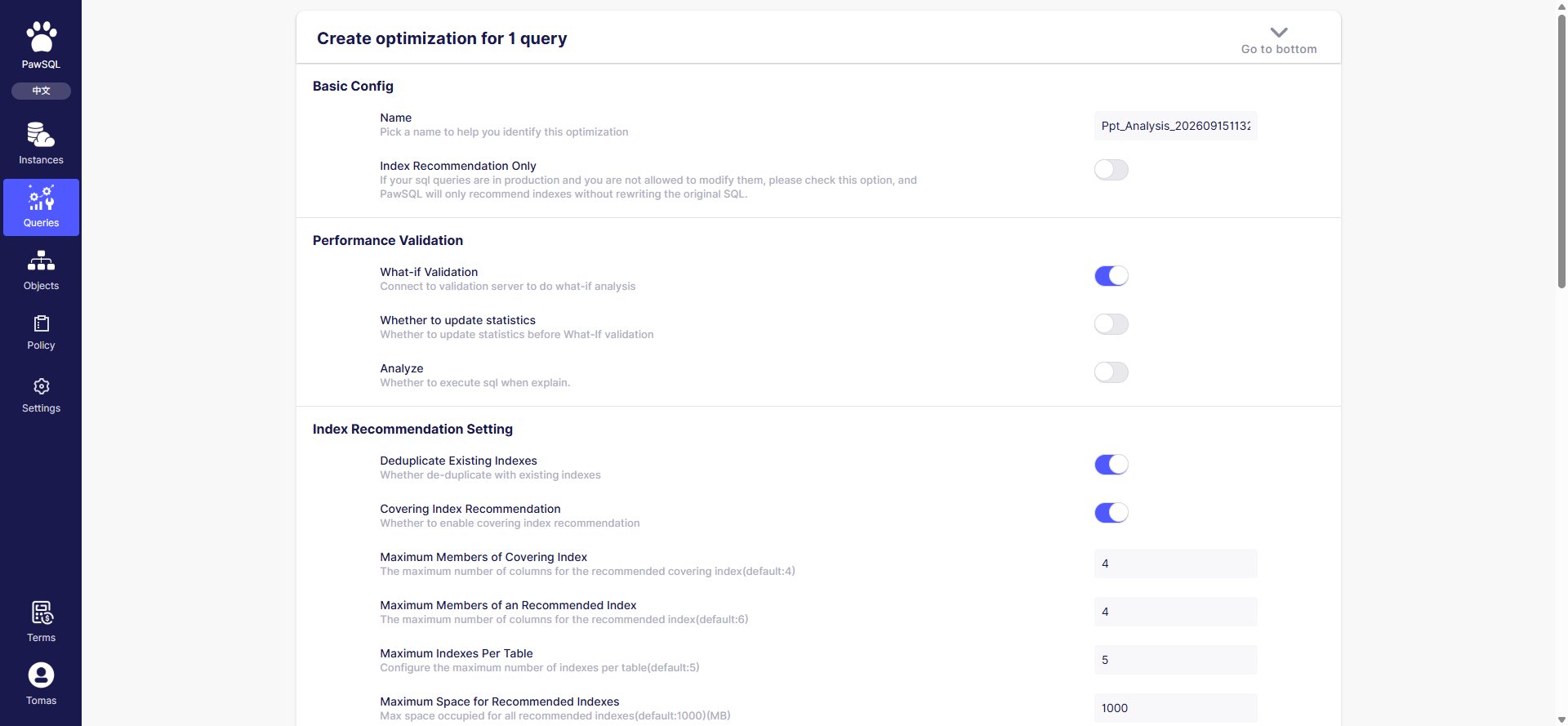
On the Slow queries page, select slow SQL and click "Batch operation → Optimize" (or a single SQL's "Optimize" button) to open the "New query optimization" page. The page title shows the number of queries involved, e.g. "Create optimization for 1 query".
 ## Basic configuration
| Setting | Meaning |
| ------------------------- | ----------------------------------------------------------------------------------------------- |
| Optimization ID | Unique identifier (ticket number) for this optimization; auto-generated from the time, editable |
| Index recommendation only | When checked, PawSQL does not rewrite SQL and only recommends indexes on the original SQL |
## Validation
| Setting | Meaning |
| ------------------ | ------------------------------------------------------------------------------------- |
| What-If validation | Connect to the validation database for What-If performance validation (on by default) |
| Update statistics | Whether to update statistics before What-If validation |
| Analyze | Whether to actually execute the SQL during `explain` |
## Index optimization
| Setting | Default | Meaning |
| --------------------------------- | ------- | -------------------------------------------------------------------------------- |
| Deduplicate with existing indexes | on | Whether to deduplicate against existing workspace indexes |
| Covering index recommendation | on | Whether to recommend covering indexes (avoids table lookups, may use extra disk) |
| Covering index max columns | `4` | Do not recommend covering indexes beyond this many columns |
| Index max columns | `4` | Maximum columns in a recommended index |
| Indexes per table | `5` | Maximum indexes per table; prompt cleanup when exceeded |
| Max space | `1000` | Maximum space (MB) occupied by all recommended indexes |
## Rule configuration
Select a rule template (such as "MySQL database audit template"), or enable/disable rules and adjust thresholds inline. Rules are organized into three top-level categories — Object Design, Object Operation, and Data Operation — and can be filtered by severity (notice / warning / critical / disabled). Selecting a template uses its rules and ignores the inline configuration.
## Submit
Review the settings and click "Create optimization task". Optimization runs server-side; results appear in the "Optimization status", "Last optimization", and "Performance gain" columns on the Slow queries page.
## Expected Result
After submission, the optimization runs server-side and its results appear in the "Optimization status", "Last optimization", and "Performance gain" columns on the Slow queries page.
## Verification
Confirm the optimization ticket number was created and the ticket is tracked on the Slow queries page.
## FAQ
| Symptom | Check first |
| -------------------------- | ------------------------------------------------------- |
| Optimization task hangs | Task queue, concurrency limits, analysis service status |
| Performance gain shows N/A | Whether optimization ran and completed |
## Related reading
## Basic configuration
| Setting | Meaning |
| ------------------------- | ----------------------------------------------------------------------------------------------- |
| Optimization ID | Unique identifier (ticket number) for this optimization; auto-generated from the time, editable |
| Index recommendation only | When checked, PawSQL does not rewrite SQL and only recommends indexes on the original SQL |
## Validation
| Setting | Meaning |
| ------------------ | ------------------------------------------------------------------------------------- |
| What-If validation | Connect to the validation database for What-If performance validation (on by default) |
| Update statistics | Whether to update statistics before What-If validation |
| Analyze | Whether to actually execute the SQL during `explain` |
## Index optimization
| Setting | Default | Meaning |
| --------------------------------- | ------- | -------------------------------------------------------------------------------- |
| Deduplicate with existing indexes | on | Whether to deduplicate against existing workspace indexes |
| Covering index recommendation | on | Whether to recommend covering indexes (avoids table lookups, may use extra disk) |
| Covering index max columns | `4` | Do not recommend covering indexes beyond this many columns |
| Index max columns | `4` | Maximum columns in a recommended index |
| Indexes per table | `5` | Maximum indexes per table; prompt cleanup when exceeded |
| Max space | `1000` | Maximum space (MB) occupied by all recommended indexes |
## Rule configuration
Select a rule template (such as "MySQL database audit template"), or enable/disable rules and adjust thresholds inline. Rules are organized into three top-level categories — Object Design, Object Operation, and Data Operation — and can be filtered by severity (notice / warning / critical / disabled). Selecting a template uses its rules and ignores the inline configuration.
## Submit
Review the settings and click "Create optimization task". Optimization runs server-side; results appear in the "Optimization status", "Last optimization", and "Performance gain" columns on the Slow queries page.
## Expected Result
After submission, the optimization runs server-side and its results appear in the "Optimization status", "Last optimization", and "Performance gain" columns on the Slow queries page.
## Verification
Confirm the optimization ticket number was created and the ticket is tracked on the Slow queries page.
## FAQ
| Symptom | Check first |
| -------------------------- | ------------------------------------------------------- |
| Optimization task hangs | Task queue, concurrency limits, analysis service status |
| Performance gain shows N/A | Whether optimization ran and completed |
## Related reading