> ## Documentation Index
> Fetch the complete documentation index at: https://docs.pawsql.com/llms.txt
> Use this file to discover all available pages before exploring further.
> ## Agent Instructions
> PawSQL 是一个产品:Cloud 是公网部署形态,Engine / Optimizer / Auditor / Advisor / Patroller 是同一产品的组件与交付形态,不是彼此独立的产品。 / PawSQL is a single product: Cloud is the public deployment form, while Engine / Optimizer / Auditor / Advisor / Patroller are components and delivery forms of the same product, not separate products.
> 术语以站内术语表为准:SQL 审核对应英文 SQL Review,查询重写对应 Query Rewrite,索引推荐对应 Index Recommendation;英文内容统一用 Review,不用 Audit。 / Use the site glossary for terminology: 审核 is SQL Review, 重写 is Query Rewrite, 索引推荐 is Index Recommendation; English content uses Review, never Audit.
> 引用能力范围或版本支持时以对应页面为准;标注 unknown、或 status 非 published 的内容表示尚未经产品核实,不应作为事实引用。 / Cite capability scope and version support from the corresponding page; content marked unknown, or with a status other than published, is not yet product-verified and must not be cited as fact.
# Create and Configure an Optimization Task
> Configure input, validation, index recommendation, and rule options to control how rewrites and index suggestions are produced.
An optimization is a performance diagnosis performed on a set of SQL within a workspace, typically including SQL audit, rewrite, and index recommendation. When creating an optimization task you can configure its input, output, data source, and execution.
## Goal
Configure input, validation, index recommendation, and rule options to control how rewrites and index suggestions are produced.
## Prerequisites
A workspace and the SQL you want to optimize within that workspace.
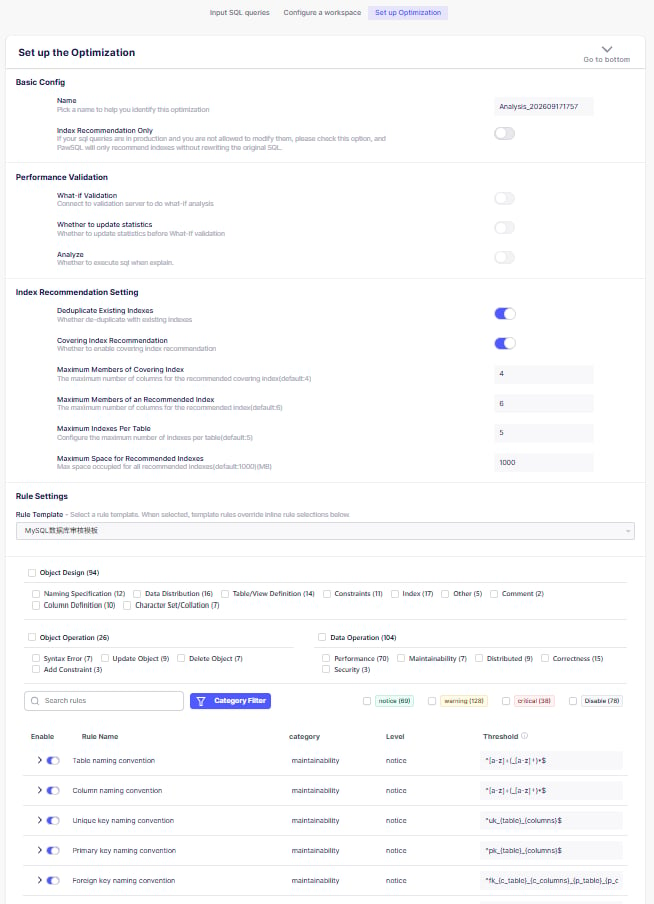
## Basic configuration
* **Optimization ID**: identifies this optimization task.
* **Index recommendation only**: controls whether rewrite is enabled. When the SQL is already in production and changes cannot be applied immediately, enable this option — PawSQL will not rewrite the SQL and will only recommend indexes based on the original SQL.
## Validation
* **Update DDL information**: whether to connect to the verification database to fetch the latest DDL.
* **Perform What-If verification**: controls whether recommendations are performance-validated. When enabled, the optimization details provide execution plans and cost estimates before and after optimization.
* **Enable Analyze**: during What-If verification, obtain the real parse and execution time so cost estimates are more accurate.
Avoid the validation options on production databases. For databases without built-in virtual indexes (such as MySQL and PostgreSQL), performance validation works by creating the recommended index, running `EXPLAIN`, and dropping the index. This consumes resources and can be slow on production.
## Index recommendation configuration
* **Dedup with existing indexes**: whether to exclude recommendations that duplicate existing indexes. Enable this when the input SQL represents only part of the database queries and you do not intend to drop existing indexes.
* **Recommend covering indexes**: whether to consider covering indexes. Covering indexes avoid table lookups and can substantially improve performance, but include columns not used in the query and increase disk usage.
* **Maximum covering index columns**: limits the column count of a covering index to bound its space usage.
* **Maximum index columns**: limits the column count of an index to avoid a wide index deepening the index tree.
* **Maximum indexes per table**: audits the index count per table and warns, since indexes add disk usage and slow down DML.
## Rule configuration
Enable or disable individual optimization rules and adjust their thresholds.
 ## Submit and confirm success
After submitting, once the task completes, at least check that:
* [ ] Parsing completed.
* [ ] Engine and version are correct.
* [ ] Schemas, tables, and columns resolved correctly.
* [ ] Statement boundaries were detected correctly.
* [ ] Expected analysis modules ran.
* [ ] No unexplained partial failure remains.
A completed task is not a claim that the SQL is optimal or that every recommendation is safe to apply.
## Expected Result
After submitting, the task runs with the configured options and produces optimization results for review.
## Next steps
## Submit and confirm success
After submitting, once the task completes, at least check that:
* [ ] Parsing completed.
* [ ] Engine and version are correct.
* [ ] Schemas, tables, and columns resolved correctly.
* [ ] Statement boundaries were detected correctly.
* [ ] Expected analysis modules ran.
* [ ] No unexplained partial failure remains.
A completed task is not a claim that the SQL is optimal or that every recommendation is safe to apply.
## Expected Result
After submitting, the task runs with the configured options and produces optimization results for review.
## Next steps