> ## Documentation Index
> Fetch the complete documentation index at: https://docs.pawsql.com/llms.txt
> Use this file to discover all available pages before exploring further.
> ## Agent Instructions
> PawSQL 是一个产品:Cloud 是公网部署形态,Engine / Optimizer / Auditor / Advisor / Patroller 是同一产品的组件与交付形态,不是彼此独立的产品。 / PawSQL is a single product: Cloud is the public deployment form, while Engine / Optimizer / Auditor / Advisor / Patroller are components and delivery forms of the same product, not separate products.
> 术语以站内术语表为准:SQL 审核对应英文 SQL Review,查询重写对应 Query Rewrite,索引推荐对应 Index Recommendation;英文内容统一用 Review,不用 Audit。 / Use the site glossary for terminology: 审核 is SQL Review, 重写 is Query Rewrite, 索引推荐 is Index Recommendation; English content uses Review, never Audit.
> 引用能力范围或版本支持时以对应页面为准;标注 unknown、或 status 非 published 的内容表示尚未经产品核实,不应作为事实引用。 / Cite capability scope and version support from the corresponding page; content marked unknown, or with a status other than published, is not yet product-verified and must not be cited as fact.
# Read Optimization Results
> Read the optimization summary and per-SQL details, and compare the original and optimized SQL and execution plans.
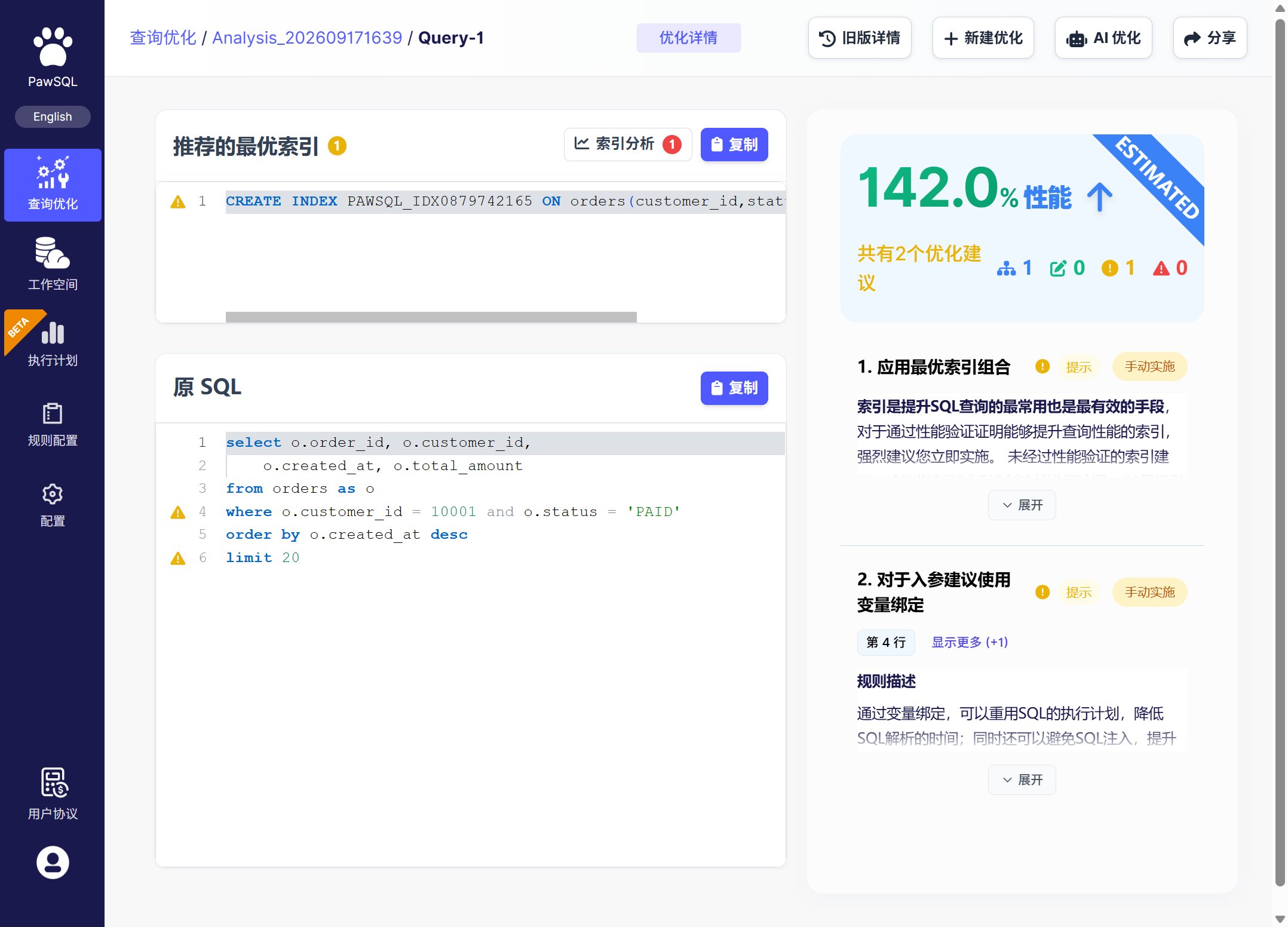
The optimization detail page presents recommendations in two levels: the optimization summary and per-SQL details. These results describe the same SQL from different angles and should be read together, not adopted mechanically.
## Goal
Read the optimization summary and per-SQL details, and compare the original and optimized SQL and execution plans.
## Prerequisites
You have a completed optimization task whose results you can open.
## Optimization summary
The summary aggregates the overall task, including:
* number of executed SQL statements;
* number of rewrites;
* number of SQL audit rule violations;
* number of recommended indexes;
* an overview of each SQL optimization.
## Optimization details
For each SQL, the detail page shows what and how it is tuned, with the following sections:
| Section | Content |
| -------------------- | --------------------------------------------------------------------------------------------------------------------- |
| Original SQL | The original statement being optimized |
| Rewritten SQL | The rewritten SQL, applied strategies, and the affected SQL fragment |
| Audit violations | Violated audit rules and the offending SQL fragments |
| Index recommendation | Recommended indexes and their rationale |
| Index analysis | Per-table index list and redundancy, how existing indexes help this SQL, and per-table index-count warnings |
| Validation | Performance improvement percentage, recommended indexes confirmed by validation, and execution plans before and after |
 ## Reading order
Verify engine, version, schema, workspace, and SQL.
Check that SQL and objects resolved and no skip or partial failure remains.
Review blocking, critical, and data-safety issues first.
Compare original and rewritten SQL, and read rule rationale and conditions.
Inspect recommended indexes, existing indexes, write cost, and query coverage.
Compare plans, cost, or measured metrics to judge actual benefit.
## Compare SQL and execution plans
* **Compare SQL**: click the "Compare SQL" button at the top right of the optimization page to show the text change before and after rewriting.
* **Compare execution plans**: click the "Compare execution plans" button to show the plans before and after optimization.
A rule not firing does not mean the SQL has no performance problem; audit rules and optimization suggestions address different concerns. Estimated cost and performance gain are decision inputs, not automatic deployment instructions.
## Expected Result
You see the optimization summary and, for each SQL, its rewrite, audit violations, index recommendation, index analysis, and validation details.
## Verification
Use the reading order to confirm context and parse completeness, and click Compare SQL and Compare execution plans to review the before-and-after differences.
## Next steps
## Reading order
Verify engine, version, schema, workspace, and SQL.
Check that SQL and objects resolved and no skip or partial failure remains.
Review blocking, critical, and data-safety issues first.
Compare original and rewritten SQL, and read rule rationale and conditions.
Inspect recommended indexes, existing indexes, write cost, and query coverage.
Compare plans, cost, or measured metrics to judge actual benefit.
## Compare SQL and execution plans
* **Compare SQL**: click the "Compare SQL" button at the top right of the optimization page to show the text change before and after rewriting.
* **Compare execution plans**: click the "Compare execution plans" button to show the plans before and after optimization.
A rule not firing does not mean the SQL has no performance problem; audit rules and optimization suggestions address different concerns. Estimated cost and performance gain are decision inputs, not automatic deployment instructions.
## Expected Result
You see the optimization summary and, for each SQL, its rewrite, audit violations, index recommendation, index analysis, and validation details.
## Verification
Use the reading order to confirm context and parse completeness, and click Compare SQL and Compare execution plans to review the before-and-after differences.
## Next steps