> ## Documentation Index
> Fetch the complete documentation index at: https://docs.pawsql.com/llms.txt
> Use this file to discover all available pages before exploring further.
> ## Agent Instructions
> PawSQL 是一个产品:Cloud 是公网部署形态,Engine / Optimizer / Auditor / Advisor / Patroller 是同一产品的组件与交付形态,不是彼此独立的产品。 / PawSQL is a single product: Cloud is the public deployment form, while Engine / Optimizer / Auditor / Advisor / Patroller are components and delivery forms of the same product, not separate products.
> 术语以站内术语表为准:SQL 审核对应英文 SQL Review,查询重写对应 Query Rewrite,索引推荐对应 Index Recommendation;英文内容统一用 Review,不用 Audit。 / Use the site glossary for terminology: 审核 is SQL Review, 重写 is Query Rewrite, 索引推荐 is Index Recommendation; English content uses Review, never Audit.
> 引用能力范围或版本支持时以对应页面为准;标注 unknown、或 status 非 published 的内容表示尚未经产品核实,不应作为事实引用。 / Cite capability scope and version support from the corresponding page; content marked unknown, or with a status other than published, is not yet product-verified and must not be cited as fact.
# Optimize Your First SQL Query
> Create a workspace, submit a query, and review rewrite, index, and performance recommendations in PawSQL.
PawSQL analyzes a query in context, identifies potential issues, and produces actionable rewrite, index, and validation results in one workflow. This guide walks you through your first optimization.
This guide follows the core workflow shown in **PawSQL in a Minute**. Initial workspace setup may take a few extra minutes; after that, optimizing a query is a three-step process.
## PawSQL in a Minute
## What you will accomplish
By the end of this guide, you will know how to:
* create or select a workspace;
* submit a query for analysis;
* review SQL findings, automatic rewrites, and index recommendations; and
* compare performance evidence when a database connection is available.
## Before you begin
You need:
* access to a PawSQL deployment and a valid account;
* a `SELECT` statement to analyze; and
* the schema definitions referenced by the query, or access to a database connection.
For a quick evaluation, create a workspace from DDL—no live database is required. Connect to a database when you need statistics-aware index advice, execution plans, or performance validation.
## Step 1: Create or select a workspace
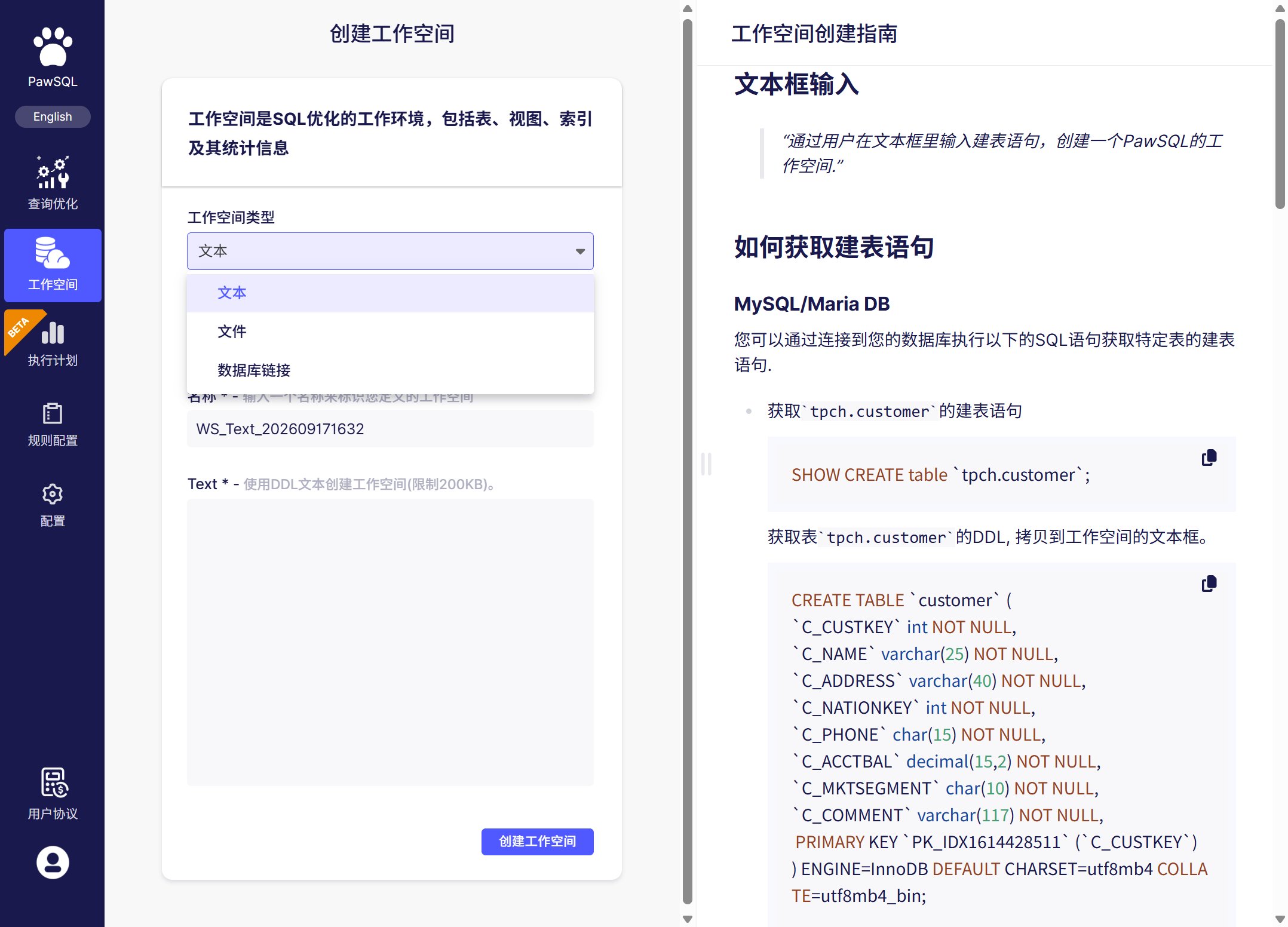
A workspace stores the database type, version, schema definitions, and available statistics that form the context for optimization. Accurate context helps PawSQL parse the query correctly and produce relevant recommendations.
Sign in to PawSQL. Select an existing workspace, or click **New workspace**.
Select the database and version on which the query actually runs. SQL syntax, rewrite rules, and index capabilities vary by database, so avoid selecting an approximate substitute.
Choose the method that fits your environment:
Paste or upload the relevant `CREATE TABLE`, `CREATE INDEX`, and related DDL. This is ideal for evaluations, development environments, or cases where direct database access is unavailable.
Enter the host, port, database name, and a read-only account, then test the connection. PawSQL can read authorized object definitions, statistics, and metadata required for execution-plan analysis.
Use a least-privilege, read-only account for production databases. Never expose passwords, internal addresses, or access tokens in screenshots, documentation, or source control.
## Step 2: Submit a query
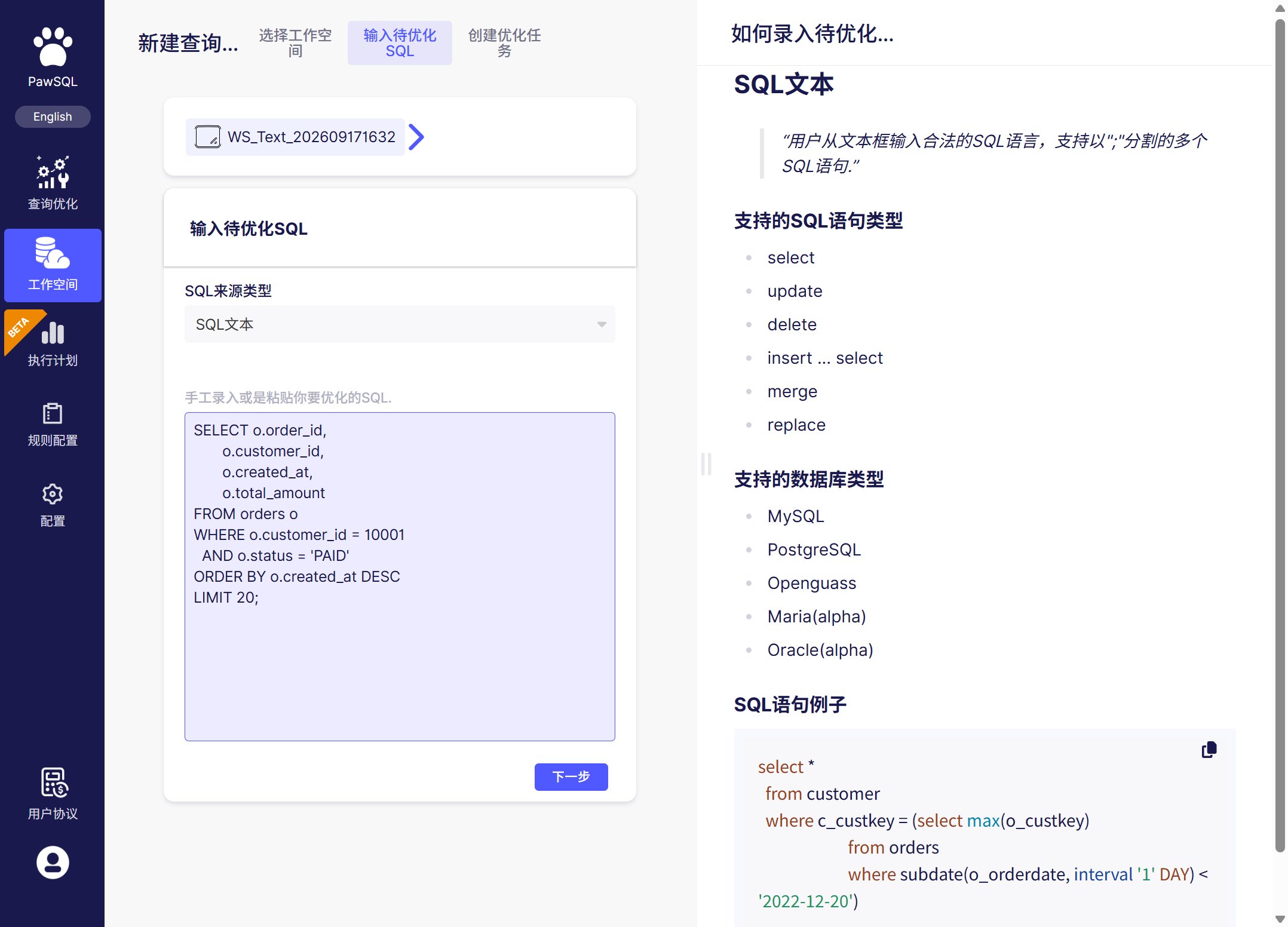
Open **SQL Optimization** in the workspace and paste the query into the editor.
The following example retrieves the most recent paid orders for a customer:
```sql theme={null}
SELECT o.order_id,
o.customer_id,
o.created_at,
o.total_amount
FROM orders o
WHERE o.customer_id = 10001
AND o.status = 'PAID'
ORDER BY o.created_at DESC
LIMIT 20;
```
Paste a complete statement. Keep the real table names, columns, join predicates, and filters because they directly affect findings and index recommendations.
Verify the selected workspace and default database or schema. If the query uses a different schema, qualify the objects in SQL or select the correct schema in the task settings.
Click **Optimize**. PawSQL parses the statement and runs SQL checks, rewrite analysis, and index analysis using the context available in the workspace.
## Step 3: Review the results
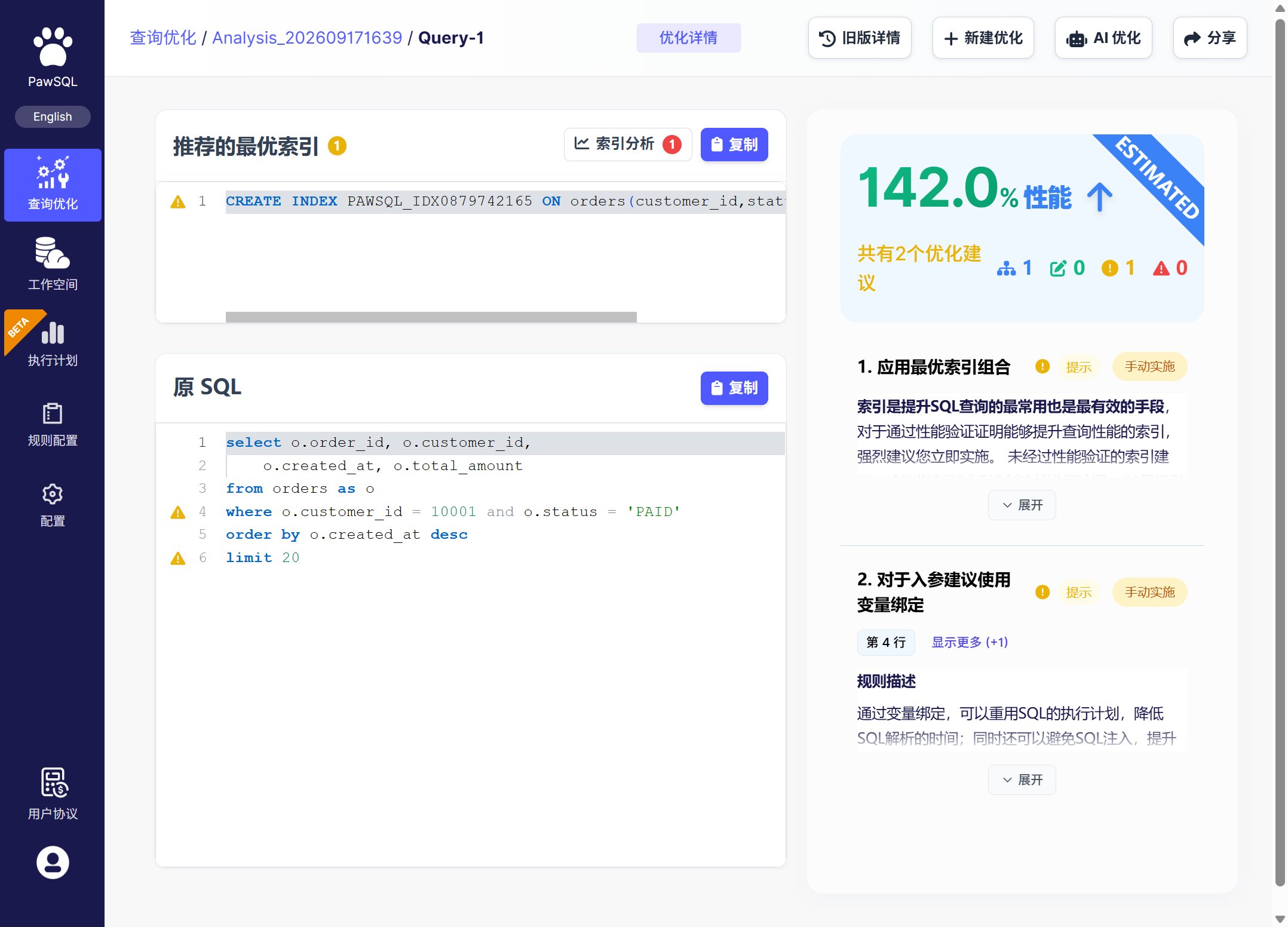
Start with the summary, then inspect each recommendation. The available result sections depend on the query and workspace context.
Surfaces correctness, performance, security, and maintainability risks, with the matched rule and remediation guidance.
Produces a semantically equivalent candidate that is easier for the database optimizer to execute efficiently.
Evaluates filter, join, sort, and grouping columns and provides candidate index DDL.
When a database is connected, compares execution plans or measured behavior before and after optimization.
### Recommended review order
1. **Resolve high-priority findings first.** Correctness and security issues usually take precedence over performance-only advice.
2. **Compare the original and rewritten SQL.** Confirm the business meaning, selected columns, and ordering behavior.
3. **Evaluate each proposed index.** Check for existing duplicate or prefix-overlapping indexes and account for write and storage overhead.
4. **Inspect the validation evidence.** Prefer changes supported by an improved execution plan or controlled measurements.
Do not apply rewritten SQL or create indexes directly in production without validation. Confirm result equivalence in a test environment and follow your organization's change process.
## If no recommendation appears
Confirm that the workspace database type and version are correct, the statement is complete, and the query does not rely on unsupported dialect syntax.
Add the DDL for every referenced table, or verify that the database account can read metadata from the required schema.
This does not necessarily mean the analysis failed. Existing indexes may already cover the access path, or an additional index may not benefit this query. Review the findings and execution plan together.
Validation generally requires a working database connection, sufficient permissions, and representative data. A DDL-only workspace can still support parsing, rule checks, rewrites, and parts of index analysis.
## Next steps
Compare web, IDE, API, and pipeline workflows.
Check database, version, and feature compatibility.
Learn how rewrites work and where their boundaries are.
Learn how to compare optimization candidates with execution evidence.
 ## Step 3: Review the results
Start with the summary, then inspect each recommendation. The available result sections depend on the query and workspace context.
## Step 3: Review the results
Start with the summary, then inspect each recommendation. The available result sections depend on the query and workspace context.
 ### Recommended review order
1. **Resolve high-priority findings first.** Correctness and security issues usually take precedence over performance-only advice.
2. **Compare the original and rewritten SQL.** Confirm the business meaning, selected columns, and ordering behavior.
3. **Evaluate each proposed index.** Check for existing duplicate or prefix-overlapping indexes and account for write and storage overhead.
4. **Inspect the validation evidence.** Prefer changes supported by an improved execution plan or controlled measurements.
### Recommended review order
1. **Resolve high-priority findings first.** Correctness and security issues usually take precedence over performance-only advice.
2. **Compare the original and rewritten SQL.** Confirm the business meaning, selected columns, and ordering behavior.
3. **Evaluate each proposed index.** Check for existing duplicate or prefix-overlapping indexes and account for write and storage overhead.
4. **Inspect the validation evidence.** Prefer changes supported by an improved execution plan or controlled measurements.